
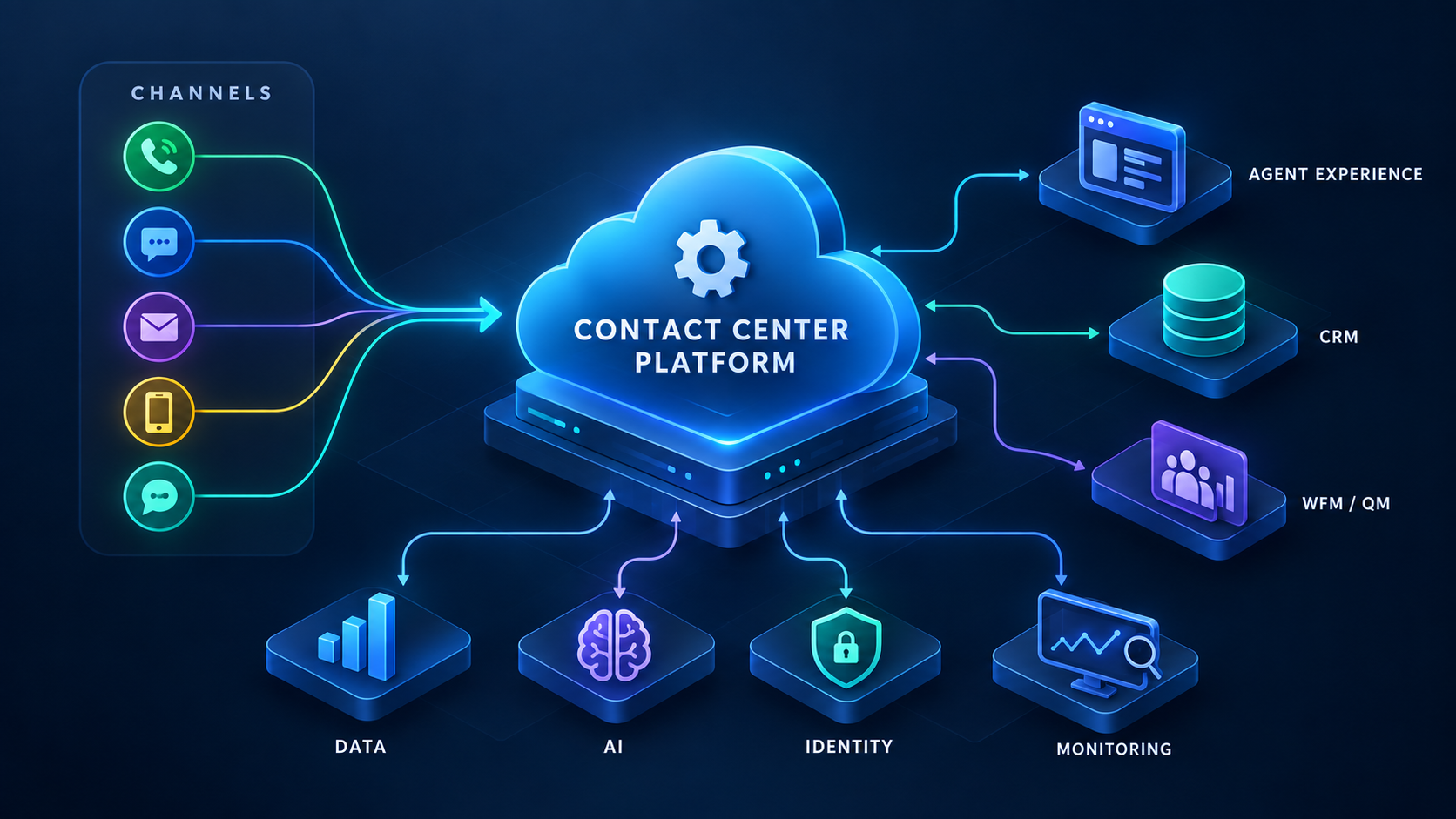
Contact Center Software: The Complete Guide to Enterprise Platforms
Contact center software powers what happens when a customer calls, chats, texts, or messages a company. It has one simple goal: guide the interaction through the customer experience while collecting the data and metrics the company needs to improve its processes.
Integrating these systems so they work together reliably is where many enterprise projects go sideways. A team decides it wants to replace a platform or vendor. It sends out an RFP, gathers a list of platforms to review, compares feature lists, sits through demos, holds endless meetings, and finally picks a platform.
Then implementation starts.
That’s when teams often discover that the platform they selected is only one piece of a much larger system.
This is where contact center leaders learn an important lesson: Buying a contact center platform does not mean buying the entire contact center technology stack. It also doesn’t mean you can simply unplug one system and plug in another because you don’t like it anymore.
This guide explains how the pieces of contact center software fit together, what each part of the system does, and how those components depend on one another. This isn’t about ranking favorite vendors or picking a winner based on the coolest features. Instead, it gives you a foundation for understanding the technology stack before you evaluate contact center software.
Table of Contents
What Is Contact Center Software?
Contact center software is the set of systems that lets an organization receive, route, handle, record, and measure customer conversations across voice and digital channels.
A call center is built primarily around voice. A contact center can also handle chat, email, SMS, messaging, and self-service, with routing and reporting that work across those channels.
The real difference is connection. And no, I don’t mean the internet connection or how the systems connect to each other. I mean the customer’s connection to the company.
Contact centers pour countless hours into improving that customer experience. With well-designed contact center software, a customer can start in chat, move to a phone call, and have the agent see the history of that interaction. But that only works when the underlying channels and systems are connected in a way that lets them share data and routing logic.
Think about the last time you called a company and got trapped talking to an AI system that didn’t understand a word you said. Ten minutes later, you’re yelling “REPRESENTATIVE! REPRESENTATIVE!” into the phone before finally giving up and hanging up.
That is exactly the kind of experience a good contact center is designed to prevent.
And it’s why selecting contact center software isn’t just a technology decision. The systems behind the scenes directly shape the experience customers have with the company.
How Contact Center Software Works
Think of contact center software as a traffic system for conversations. One interaction might look like this:
- A customer makes contact by phone, chat, text, or email.
- Self-service may run first. An IVR (interactive voice response) menu or virtual agent may answer, collect information, or even resolve the customer’s issue.
- Routing decides where the interaction should go. It considers which agents are qualified, or “skilled,” and available based on things like the customer, reason for contact, channel, and time.
- A queue, cue the elevator hold music, holds the contact until a suitable agent is available.
- The agent connects. Their workspace opens the conversation and, ideally, pulls relevant customer information from the CRM and other connected systems.
- The interaction is recorded and measured. That data can flow into workforce, quality, and reporting systems for performance metrics, training and coaching, business analytics, and other uses.
If you dig into the official documentation for some of the most popular contact center platforms, you’ll see a similar pattern. For example, Amazon Connect describes routing using queues, routing profiles, and flows. Other platforms may use different names, but many of the underlying concepts are similar.
Traditionally, the core contact center platform handled the conversation while many of the systems around it came from somewhere else. That line is starting to blur.
As CCaaS (Contact Center as a Service) has become more common, vendors have continued adding capabilities that once required separate products. Workforce management, quality management, analytics, AI, digital channels, and other capabilities can increasingly live within the same platform.
But that doesn’t make the surrounding technology stack disappear.
That distinction becomes extremely important when you start evaluating contact center software.
Core Components of a Contact Center Platform
Most contact center software combines multiple components, features, capabilities, and tools for managing and analyzing customer interactions.
Depending on the vendor, some of these components may be built into the platform, offered as additional modules, or provided through integrations with other systems.
| Component | What it does | Common dependencies |
|---|---|---|
| Telephony | Connects calls to and from phone networks | Carriers, SIP trunks or other carrier connections, network connectivity and quality |
| Digital channels | Supports chat, email, SMS, and messaging | Websites, apps, messaging providers, channel integrations, consent requirements |
| Routing engine | Determines where customer interactions go | Queues, routing rules, agent availability, skills, customer data |
| IVR / self-service | Guides callers through menus or automated services | Call flows, backend systems, speech recognition, AI services |
| Agent desktop | Provides an interface for agents to handle interactions | CRM, knowledge base, telephony integration, supported devices |
| CRM and business apps | Manage customer records, cases, and business processes | APIs, data quality, access controls, integrations |
| Workforce management (WFM) | Forecasts workload and manages staffing schedules | Historical interaction data, staffing information, scheduling rules |
| Quality management (QM) | Evaluates agent interactions and performance | Recordings or transcripts, evaluation forms, quality processes |
| Recording | Captures and stores customer interactions | Recording services, storage, retention policies, access controls |
| Reporting and analytics | Measures performance and provides operational insights | Interaction data, metric definitions, reporting tools, data integrations |
| AI and automation | Supports virtual agents, agent assistance, summaries, and automated workflows | AI services, knowledge sources, integrations, security and privacy controls |
| Identity and access | Controls authentication and user permissions | Identity providers, SSO, user provisioning, roles |
| Monitoring | Helps detect technical issues and service disruptions | Logs, metrics, alerts, monitoring tools, incident processes |
As you can see, many of these components depend on systems, services, or processes outside the contact center platform itself.
This becomes especially important when you introduce something new into an existing environment, whether you’re replacing a vendor, adding a capability, or running a proof of concept (PoC) to guide a future decision.
The new technology isn’t going to operate in isolation.
It has to work with the systems, data, networks, security controls, business processes, and people already there. A platform can work perfectly on its own but fail miserably once those dependencies come into play.
That’s why understanding the surrounding environment is just as important as understanding the platform itself.
Buying a Platform Is Not Buying the Whole Stack
Contact center software typically gives you the core routing and interaction capabilities, along with whatever additional modules the vendor includes or offers. Sometimes those modules come at an additional cost.
And when it comes to vendors, there’s almost always another fee somewhere.
Even with those fees, don’t assume you automatically get:
- Your CRM connected the way agents need it.
- SSO and user provisioning working with your identity provider (IdP).
- Your recording, quality, or workforce management tools migrated or replaced.
- Reporting that matches your current metric definitions.
- Contact center data flowing into your data warehouse.
- Monitoring that tells you when an integration breaks.
- Clear ownership and accountability after go-live.
- A maintenance and support plan for the complete solution.
- Functionality you never documented as a requirement.
- Every capability your current environment provides.
- PCI-compliant processes simply because the platform supports PCI compliance.
These are all part of the meetings and conversations required to assess your current environment, understand business and technical requirements, design the solution, test it, implement it, and eventually support it.
And there’s another piece technical teams sometimes miss: just because engineering thinks the shiny new platform is the best thing since sliced bread doesn’t mean operations will agree.
If you support contact centers from the technical side, your immediate customer is often the person using the technology every day: the agent, supervisor, or operations team.
A solution can meet every documented technical requirement and still fail if the people using it hate it, don’t understand it, or can’t do their jobs as effectively as they could before.
That means a successful contact center implementation has to satisfy business requirements, technical requirements, and user requirements.
Someone still has to discover those requirements, design the solution, connect everything, test it with the people who will actually use it, and support it after go-live.
The platform is the product you bought, another tool in your belt. The working, stable, cohesive contact center is the system you still have to build.
CCaaS vs. Hosted vs. On-Premises Contact Centers
Where your contact center software runs shapes cost, speed, control, and who is responsible for what.
There are three common deployment models:
- On-premises: Your organization runs and manages the contact center software and supporting infrastructure, typically in its own data centers.
- Hosted: A provider hosts and manages some or all of your contact center technology, such as telephony or call recording. This may involve a dedicated instance of traditional software running in the provider’s data center or cloud environment.
- CCaaS (Contact Center as a Service): A cloud-based service that provides contact center capabilities without requiring your organization to host the core platform infrastructure. Genesys defines CCaaS as a cloud-based model for managing customer interactions without on-premises contact center systems.
But if I’m being honest, you have to be careful with vendor marketing.
Vendors are constantly introducing new features, upgrades, approaches, and platform releases, all while trying to get you to sign or renew a contract.
These labels are sometimes used loosely, and just because a vendor calls something “cloud” doesn’t mean it operates the way you expect.
Don’t take the marketing at face value. Ask questions. Lots of them.
Understand how the product is built, where it runs, what the vendor manages, what your team is responsible for, and how it integrates with your existing environment.
| Factor | On-premises | Hosted | CCaaS |
|---|---|---|---|
| Who runs infrastructure | Your organization | Provider, often with dedicated resources | Provider |
| Upfront cost | Often higher due to infrastructure and licensing | Varies by hosting and licensing model | Often lower infrastructure investment |
| Speed of change | Controlled by your organization, subject to vendor support | Depends on provider and contract | Vendor manages platform releases; customers manage their own changes |
| Data location | Controlled by your infrastructure choices | Defined by hosting arrangements | Depends on available vendor regions and services |
| Operations | Primarily your organization | Shared responsibilities | Vendor manages the core service; your team manages configurations, integrations, and customer responsibilities |
No model is best for everyone. Regulated industries may prioritize control over infrastructure and data. Seasonal businesses may place greater value on scalability and the ability to adjust capacity.
And remember, the deployment model alone doesn’t tell you everything. You still need to understand the architecture, contracts, service levels, and operational responsibilities.
One caution applies to all three: moving the platform does not automatically move its dependencies.
Your CRM, identity systems, recording archives, and other integrations still need to work reliably.
The last thing you want is to take away a key function your agents depend on because something was overlooked during discovery or implementation.
Once again, you can’t just start unplugging things!
Omnichannel Contact Center Software
An omnichannel contact center allows customers to move between communication channels while keeping the context of their interactions.
For example, imagine starting a conversation through a company’s website chat. You explain your issue to a chatbot, but it can’t resolve the problem. You decide to call instead, go through an AI-assisted IVR, and eventually get transferred to a live agent.
In a properly integrated omnichannel environment, the agent can already see your previous conversation, understand why you’re calling, and pick up where you left off.
A multichannel contact center, on the other hand, supports multiple communication channels, but those channels don’t necessarily share information or context.
Imagine that same situation, except this time, when you call, the IVR has no idea you were just chatting with the company. You explain your issue again, get transferred to an agent, and have to repeat everything for a third time.
Sound familiar?
That’s the difference. Multichannel gives customers multiple ways to contact a company. Omnichannel connects those experiences so customers don’t have to start over every time they switch channels.
Different companies take different approaches to delivering this experience.
For example, Microsoft and Google Cloud both offer omnichannel contact center platforms, but their architectures and approaches differ.
Microsoft’s Dynamics 365 Contact Center uses unified routing to manage voice and digital interactions. It also provides a common data framework across channels, allowing agents to access customer information and conversation history in a connected experience.
Google Cloud’s CCAI Platform provides omnichannel routing across voice and digital channels, with an emphasis on AI-powered interactions, embedded customer experiences, and integration with existing CRM systems.
Both platforms aim to connect customer interactions across channels, but they offer different architectures, integration options, and approaches to managing the customer experience.
Making all these channels work together as one system takes cross-team collaboration, technical expertise, and sometimes troubleshooting complex integrations at a very granular level.
When implemented correctly, an omnichannel environment can deliver:
- A shared customer identity: Connecting interactions across channels to the same customer, so the person chatting on the website can be recognized when they call.
- Shared interaction history: Giving agents access to relevant conversations and customer information in one place.
- Consistent routing: Applying coordinated routing rules, agent skills, and service goals across channels.
- Channel-specific handling: Accounting for the differences between channels. For example, an agent may handle one voice call at a time while managing multiple chat conversations, depending on the platform and configuration.
The important thing to understand is that supporting multiple channels and connecting them into one customer experience are two different things.
Just because a vendor advertises omnichannel capabilities doesn’t mean those capabilities will automatically work across every system in your environment.
You still have to understand how customer identities are matched, how conversation history is shared, how interactions are routed, and what happens when a customer switches channels.
Routing, IVR, and Customer Journeys
IVR (Interactive Voice Response) is the automated phone system you interact with when calling a company.
Cue the robotic voice: “Thank you for calling Jim’s Gym Equipment. For squat racks, press 1. For barbells, press 2…”
Modern IVR systems can do much more than play menus. Depending on how they’re configured, they can look up accounts, verify customer information, and complete simple tasks without transferring callers to an agent. Some even use conversational AI, allowing customers to speak naturally instead of navigating traditional menus.
However, self-service is only useful if it can actually help customers resolve their issues. And its ability to do that often depends on how well it connects to the systems holding the information it needs.
Routing determines where customer interactions go and which agents or teams handle them. Common methods include skills-based routing, priority routing, business-hours routing, overflow routing, customer-data-based routing, and channel-aware routing.
For example, in Amazon Connect, routing profiles associate queues with agents and define which channels they can handle, along with their contact concurrency limits.
A customer journey is the full experience a customer has with a company across interactions and channels, from their initial need through resolution and beyond.
When designing IVR and routing, start with the most common reasons customers contact your company, not just how your departments are organized.
The goal is to help customers reach the right resource, whether that’s self-service, an agent, or another team, without unnecessary transfers or having to repeat themselves.
Agent Desktop and CRM Integration
The agent desktop is the interface agents use throughout their workday.
You know that little phonepad with all the fancy buttons and flashing green and red availability indicators?
Yeah, that guy.
The agent experience is one of the most important parts of the entire contact center workflow. And while the contact center platform provides the core tools, how well those tools integrate with the rest of your environment can make or break the experience.
Weak CRM integration leaves agents switching between windows, copying information from one system to another, and complaining to their leaders and engineers about how bad the process sucks!
There are two common approaches to designing the agent experience.
1. Agents work in the contact center vendor’s desktop.
The vendor provides the primary interface for handling calls and other interactions. Customer information and business applications can be connected through integrations.
For example, Avaya offers agent desktop applications that provide interaction controls and can integrate with CRM systems.
2. Contact center controls are embedded inside the CRM.
Instead of working primarily in a separate contact center application, agents handle interactions directly within a CRM such as Salesforce. Call controls, customer information, and case management can appear together in the same workspace.
Google Cloud’s CCAI Platform supports this type of approach through CRM integrations and embedded agent experiences, allowing agents to use contact center functionality alongside the business applications they already work in.
Neither approach automatically guarantees a better experience. What matters is how well the complete solution supports the work your agents actually need to perform.
Remember, ask questions early:
- Which system is the system of record? Where is the authoritative customer or case information stored?
- What functionality must agents retain? Which features and workflows are required to do their jobs?
- What happens when an integration is slow or unavailable? Can agents continue working, or does the failure interrupt their entire workflow?
- Who maintains each integration? Who is responsible when the contact center platform, CRM, or another connected system is updated?
The goal isn’t just to give agents a new interface. It’s to give them a reliable workspace that helps them do their jobs without creating unnecessary steps or introducing new problems.
Workforce Management, Quality, and Recording
Workforce management (WFM) software helps contact center operations forecast workload and build staffing schedules using historical interaction volume, average handle time, service-level goals, and other factors.
Simply put, these tools help operations predict how many agents they’ll need and when they’ll need them.
Workforce engagement management (WEM) and workforce optimization (WFO) are broader categories of contact center software that may include workforce management, quality management, recording, coaching, performance management, and analytics.
Companies like Verint and NICE offer workforce management solutions that can be deployed alongside other contact center platforms. They also offer broader suites with additional capabilities.
For example, NICE’s CXone workforce engagement tools include forecasting and scheduling, quality management, interaction recording, screen recording, and AI-powered analytics. Some of these tools can analyze conversations and agent behaviors to help supervisors identify coaching opportunities.
The important thing to understand is that these capabilities don’t always come from the same vendor. A company might use one platform to route calls, another to manage staffing, and a third to record and evaluate interactions.
And, of course, someone has to make sure they all work together.
Quality Management
Quality management (QM) software gives contact center leaders a way to evaluate agent interactions against a scorecard based on the behaviors, processes, and performance standards that matter most to the business.
For example, a supervisor might review a call to determine whether the agent verified the customer’s identity, followed the correct process, resolved the issue, and communicated professionally.
Traditionally, quality teams reviewed a sample of recorded interactions and manually scored them.
Modern QM platforms may also use AI to analyze conversations, identify trends, evaluate certain behaviors, and help supervisors focus their coaching efforts.
However, automated evaluations still need appropriate configuration, validation, and oversight.
Interaction Recording
Recording software captures customer interactions, but depending on the product, it can do much more than record someone’s voice.
Some platforms can capture agent screens, generate transcripts, analyze conversations, and use AI to summarize interactions.
With capabilities like these, you need to think about more than simply turning recording on.
Where will the recordings be stored? Will they remain in the vendor’s environment, or will you export them to your own storage or data warehouse? How long will you keep them? What happens to your recording archives when you migrate to another platform?
You also need to understand how recording, transcription, screen capture, and AI features handle sensitive information.
This becomes especially important when your company processes payments or handles personally identifiable information (PII).
The PCI Security Standards Council provides guidance for protecting telephone-based payment card data. PCI DSS generally prohibits storing sensitive authentication data, including card verification codes, after authorization, even if that information is encrypted.
Your security and compliance teams should help define how payment information is protected throughout the recording process.
And that’s where the questions start:
- Recording scope: Are you recording every call or only certain interactions? Are agent screens being recorded too?
- Sensitive data: What information must be masked, suppressed, or redacted? Does that protection apply to audio, screens, transcripts, and AI-generated summaries?
- Recording controls: When should recording pause or resume? What happens if those controls fail?
- Data storage: Where are recordings and transcripts stored? How long are they retained, and how are they deleted?
- Access permissions: Who can listen to recordings, view transcripts, download files, or access unredacted information?
- Integrations: How will recordings connect to quality management, analytics, and other systems?
- System ownership: Who maintains the platform, manages permissions, monitors integrations, and handles incidents when something breaks?
These are all decisions that need to be made during discovery and solution design, not after the platform goes live.
Buying recording, quality, or workforce management software doesn’t automatically give you a working solution. You still have to define the requirements, connect the systems, protect the data, and establish who is responsible for keeping everything running.
Reporting, Analytics, and Observability
When you’re building a complex contact center environment, you also have to think about the data you’re collecting and measuring.
Some of that data helps the business understand how well it’s serving customers. Other data helps technical teams understand whether the technology supporting those interactions is working correctly.
Both are critical, but they tell different stories and answer different questions.
For example:
| Business Reporting | Technical Monitoring (Observability) | |
|---|---|---|
| Main question | How well are we serving customers? | Is the technology working as expected? |
| Typical metrics | Wait time, abandonment rate, average handle time, service level, agent availability | Latency, error rates, failed API calls, integration health, service availability |
| Typical users | Operations managers, supervisors, agents | Platform engineers, IT operations, support teams |
| What it catches | Service problems, staffing issues, performance trends | Platform outages, integration failures, certificate expirations, technical issues that may not immediately appear in business metrics |
Remember, all these systems connect and serve a purpose.
A broken CRM integration can cause havoc for agents who suddenly can’t access accurate customer information.
Call recording failures can create problems for supervisors and quality teams who need to review past interactions and coach agents.
A workforce management (WFM) failure can disrupt forecasting or scheduling, leaving operations without the information they need to plan staffing and handle incoming interactions.
Everything is connected, and a failure in one system can create problems somewhere else.
Without proper monitoring, internal teams may not discover these failures until agents start reporting problems or customers are already being affected.
And in one way or another, these issues can affect the customer experience, operational performance, and ultimately the company’s bottom line.
That’s why it’s important to establish a shared understanding of which metrics matter, how they’re calculated, and what service levels are expected from each platform.
For example, two vendors might calculate similar metrics differently. One might measure service availability at the platform level, while another might exclude certain components or scheduled maintenance from its availability calculations.
You need to understand those differences.
Make sure you’re getting the right data, at the right time, in the format you expect.
Understanding Observability
Observability is the ability to understand what’s happening inside a system by examining the data it produces, including logs, metrics, and traces.
This helps technical teams investigate failures, identify performance problems, and understand how different components are behaving.
For example, a contact center platform might be available and successfully routing calls, but an integration with your CRM could be failing.
From the contact center vendor’s perspective, the platform may be operating normally.
From the agent’s perspective, the system is broken because customer information isn’t loading.
Both can be true.
Vendors typically monitor the infrastructure and services they’re responsible for. However, they may have limited visibility into your internal integrations, identity provider, CRM, network, and other connected systems.
Those components may be owned and managed by different internal teams or third-party providers.
And unless monitoring responsibilities are clearly defined, it’s easy for problems to fall through the cracks.
Someone on your side needs to understand how the complete environment fits together, what needs to be monitored, and who is responsible when something breaks.
Because a vendor telling you its platform is healthy doesn’t necessarily mean your contact center is working.
AI and Automation in Contact Centers
AI shows up in contact center software in a few different ways.
- Virtual agents interact directly with customers through voice or text. Google’s Conversational Agents (Dialogflow CX) can be used to build conversational experiences for chatbots, applications, and automated voice systems.
- Agent Assist helps live agents during customer interactions. Google’s Agent Assist supports capabilities such as suggested responses, knowledge assistance, and conversation summarization.
- Transcription and summarization convert conversations into text and generate summaries that can reduce manual work. Microsoft documents Copilot capabilities in Dynamics 365 Contact Center that support agents with AI-powered assistance and summaries.
I don’t think people always understand just how much of an impact automation can have in a contact center.
For example, I once helped stand up a call recording platform. Another team then built a custom application that used recordings from that platform to automatically summarize customer conversations.
That initiative significantly reduced the time agents spent completing tasks after their calls.
Here were the reported results:
- $12 million in annualized cost savings.
- 700% return on investment (ROI).
- 47.8% reduction in after-call work (ACW), with average ACW dropping from approximately 115 seconds to 55 seconds.
- 94% summary accuracy, based on the project’s evaluation.
Think about that for a second.
We’re talking about reducing the average time agents spend on post-call work by roughly a minute per interaction.
When you’re operating a large contact center handling thousands of interactions, those seconds add up.
And that’s where AI and automation can become extremely valuable.
But remember, AI is only as useful as the systems, data, and processes supporting it.
A virtual agent that can’t access your order management system won’t be able to reliably answer questions about a customer’s order. An AI summarization tool that produces inaccurate information can create more problems than it solves.
And just because a vendor advertises a particular capability or performance metric doesn’t mean you’ll achieve the same results in your environment.
Test AI capabilities against your own business requirements, customer interactions, and operational processes before committing to a solution.
We’ll explore AI and automation in greater detail in the OPTIMIZE section of this website.
Security, Identity, Compliance, and Reliability
Oh, the cybersecurity team.
If you’ve ever tried introducing new contact center software into an enterprise environment, you’ve probably worked with them. They’re often the gatekeepers when it comes to approving new technologies, integrations, and access to company systems.
But security isn’t just one team’s responsibility.
It’s a collective effort involving cybersecurity, identity and access management, compliance, networking, engineering, and sometimes site reliability engineering (SRE).
Depending on your environment, you may need to work with identity teams to integrate a new platform with providers like Microsoft Entra ID (formerly Azure AD) or Ping Identity. You may also need security reviews, compliance assessments, network changes, and monitoring requirements before the platform can go live.
All these teams play a role in making sure the technology is secure, reliable, and properly integrated into your environment.
Identity and Access Management
Identity and access management (IAM) controls who can access a system and what they’re allowed to do once they’re inside.
Single sign-on (SSO) allows employees to authenticate using their company identity instead of maintaining separate login credentials for every application.
But getting through the login screen is only part of the process.
Does the user actually have an account in the platform? And what permissions should that account have?
That’s where user provisioning and role-based access control come in.
Some platforms require administrators to create users manually. Others support automated provisioning through standards like System for Cross-domain Identity Management (SCIM), which allows compatible identity systems and applications to exchange user information.
When properly configured, SCIM can automate tasks like creating, updating, and deactivating user accounts, reducing the amount of manual work required from administrators.
This is especially important in contact centers, where staffing levels can change frequently.
Think about the holiday season.
Large retailers like Amazon, Walmart, and Home Depot may increase contact center staffing to handle seasonal demand.
Now imagine having to manually create thousands of user accounts, assign permissions, place agents in the correct teams, and configure their access across multiple systems.
Then, when the holiday season ends, you have to go back and remove or deactivate all those accounts.
One by one.
That would be an operational nightmare.
Automated provisioning helps reduce that workload, while timely deprovisioning helps prevent former employees or temporary workers from retaining access they no longer need.
For broader guidance on digital identity and authentication, see the NIST SP 800-63 Digital Identity Guidelines.
Compliance
Depending on your industry and where you operate, you may need to account for requirements involving:
- PCI DSS: Security requirements for environments that store, process, or transmit payment card data.
- HIPAA: Requirements for protecting certain health information handled by covered entities and their business associates.
- GDPR: Data protection requirements that may apply when processing personal data involving individuals in the European Economic Area.
- Recording consent: Laws and regulations governing when customer interactions can be recorded.
- Data residency: Requirements or policies concerning where certain information is stored or processed.
Depending on your industry, you’re probably already familiar with some of these.
If you work in retail, PCI DSS and the protection of customer information may be major concerns. If you work in healthcare, HIPAA may apply to systems handling protected health information.
But don’t assume that because a vendor advertises compliance certifications, your entire implementation automatically meets those requirements.
You still need to understand where data is stored, how it’s protected, who can access it, and which responsibilities belong to your organization versus the vendor.
Reliability and Service-Level Agreements
Reliability is another area where you need to understand exactly what you’re paying for.
Vendors typically document service availability commitments in a service-level agreement (SLA).
These agreements may define availability targets, how uptime is measured, exclusions, and what remedies are available when commitments aren’t met.
But don’t stop at the availability percentage.
Understand what the vendor is actually committing to.
The last thing you want is to be on a call during a major outage, expecting an immediate resolution, only to discover that the vendor’s support agreement doesn’t guarantee the response or restoration time you expected.
Now you’re arguing about escalation procedures and contractual obligations while your contact center is experiencing an outage.
And if you’re operating at the enterprise level, you may be paying these vendors hundreds of thousands or even millions of dollars over the life of the contract.
Know what you’re paying for, what’s covered, and what happens when something breaks.
Also, remember that a vendor’s SLA doesn’t necessarily cover your entire contact center environment.
Your CRM, identity provider, internal network, and custom integrations may have separate support agreements, responsibilities, and availability commitments.
A contact center platform can be considered “up” according to the vendor while agents are unable to use it because SSO is failing or a network connection is down.
Once again, the platform being available doesn’t mean the complete solution is working.
Operational Ownership and Documentation
Have a plan.
Before go-live, decide who owns:
- Platform configuration and administration.
- Integrations and connected systems.
- User provisioning, permissions, and access reviews.
- Monitoring, alerting, and incident response.
- Vendor escalations and support coordination.
- Maintenance, upgrades, and certificate renewals.
- Documentation and operational procedures.
Unowned dependencies have a way of becoming problems at the worst possible time.
And if you’re responsible for supporting a platform, make documentation a habit.
Personally, I have a rule I try to follow: if I have to do something more than three times, I look for a way to automate it.
The same thinking applies to documentation and repeatable processes.
There’s nothing like having to rotate a certificate on a system you haven’t touched in two years, only to discover that the last person who performed the procedure no longer works for the company.
Now you’re trying to figure out what was done, why it was done, and whether changing something will break another system.
This is why relying on tribal knowledge is dangerous.
It’s great to be the person everyone comes to because you understand a system. But it’s not great for the organization when critical knowledge exists only in someone’s head.
People change roles. Employees leave. Technologies evolve.
Without documentation, teams waste time rediscovering information that someone already knew.
Build a habit of documenting your processes, standardizing repeatable work, and automating what makes sense.
At the end of the day, that’s a big part of engineering: finding ways to make systems more reliable, processes more efficient, and everyone’s job a little easier.
What Enterprises Should Evaluate Before Choosing Contact Center Software
Before choosing a contact center platform, you need to understand what your business requires, how your existing systems work, and what the new technology will need to support.
Use this checklist to guide vendor evaluations, requirements gathering, and solution design.
| Area | Key Questions | Common Blind Spot |
|---|---|---|
| Business requirements | What business problems are we solving? What capabilities must the new platform support? | Selecting features before documenting business needs and acceptance criteria. |
| Customer journeys | Why do customers contact us? What should happen from the first interaction through resolution? | Designing around internal departments instead of customer needs. |
| Channels and telephony | Which channels are required? What happens to existing phone numbers, carriers, and call entry points? | Assuming phone numbers, carrier connections, and digital channels migrate automatically. |
| IVR and self-service | What menus, languages, prompts, and automated workflows must be supported? | Overlooking existing IVR logic, prompt dependencies, and customer experience requirements. |
| Routing and queues | How are interactions routed by language, business rules, operating hours, and agent availability? | Assuming existing queues and routing rules can be moved without redesign or testing. |
| Agent desktop | Where will agents work? What call controls, customer information, and workflows must they retain? | Choosing a platform without validating the agent experience. |
| Integrations | Which CRM, identity, payment, reporting, and other systems must connect? Who owns each integration? | Assuming a vendor-supported integration will automatically meet your business requirements. |
| Architecture and networking | How will calls and data move between systems? What network connectivity and security requirements apply? | Evaluating the platform without understanding the complete technical environment. |
| Identity and access | How will SSO, provisioning, permissions, and agent access be managed? | Overlooking manual administration, role requirements, and deprovisioning. |
| Workforce management | How will forecasting, scheduling, and historical reporting data reach WFM systems? | Assuming workforce integrations and reporting feeds are included. |
| Quality and recording | What must be recorded? How will recording controls, retention, access, and quality evaluations work? | Overlooking recording dependencies, compliance controls, and historical archives. |
| Reporting and analytics | Which operational metrics and reports are required? How will data be accessed and exported? | Discovering that the new platform calculates metrics differently or lacks required data. |
| AI and automation | Which AI capabilities are required? What data and integrations do they depend on? How will results be validated? | Buying AI features based on demonstrations without testing real business scenarios. |
| Security and compliance | What requirements apply to customer data, payment processing, recording, and vendor access? | Treating vendor compliance claims as proof that the complete solution is compliant. |
| Reliability and monitoring | What do vendor SLAs cover? How will integrations and end-to-end service health be monitored? | Assuming vendor platform availability means the entire contact center is working. |
| Migration and testing | What must be migrated, rebuilt, tested, or retired? How will business users validate the solution? | Failing to test critical workflows before go-live. |
| Operational ownership | Who manages configuration, integrations, permissions, incidents, and ongoing maintenance? | Assuming the vendor will support everything after implementation. |
| Vendor fit and support | Does the vendor support our requirements, architecture, service expectations, and future needs? | Choosing based on price, relationships, or impressive demonstrations alone. |
| Total cost of ownership | What will licensing, telephony, AI, integrations, migration, support, and ongoing operations cost? | Comparing subscription prices instead of the complete cost of the solution. |
How to Use This Checklist
Start by documenting your current environment and identifying the systems, applications, and business processes your contact center depends on.
Then:
- Document your requirements. Identify what the business needs, what agents must be able to do, and what the technology must support.
- Map your dependencies. Identify every system the new platform needs to connect with, including telephony, CRM, identity, workforce management, and reporting.
- Evaluate vendors against those requirements. Ask vendors to demonstrate how their products will support your actual workflows, not just their most impressive features.
- Test real scenarios. Validate critical workflows from beginning to end, including routing, agent interactions, integrations, reporting, and failure scenarios.
- Assign ownership. Decide who will configure, maintain, monitor, and support each component after go-live.
The goal isn’t to find the contact center platform with the most features. It’s to find the platform that meets your requirements and can operate reliably within your environment.
Contact Center Software Architecture Example
Here’s a simplified example of a contact center architecture to show how customer interactions move through the platform and how the supporting systems fit together.
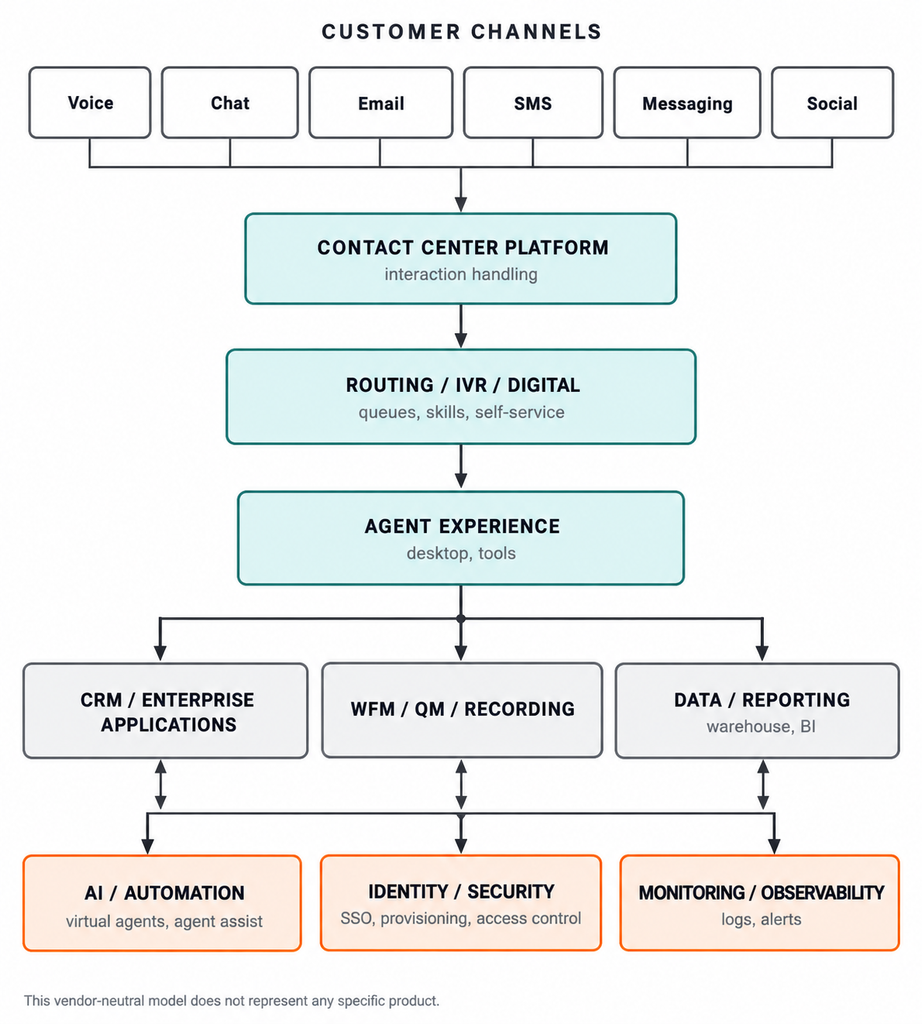
Top to bottom shows the general path of a customer interaction.
How does a customer get in touch with your company?
They might call, send an email, start a chat, or reach out through social media.
The contact center platform receives the interaction. Routing rules, IVR menus, or digital workflows determine what happens next, including whether the customer can resolve the issue through self-service or needs to speak with an agent.
If an agent is needed, the interaction is routed to the appropriate queue or agent based on your business rules.
The supporting systems help make everything work.
Your CRM provides customer information. Workforce management helps plan staffing. Recording and quality management support compliance, evaluations, and coaching. Reporting systems help the business understand what’s happening.
AI, identity management, security, and monitoring also play important roles throughout the environment.
These systems exchange information, support workflows, and help keep the contact center running.
Every connection represents a dependency.
And every dependency needs to be understood, secured, tested, monitored, and maintained.
When something breaks, the symptoms don’t always point directly to the problem.
For example:
- A failed identity integration might prevent agents from logging in.
- A slow CRM integration might increase average handle time because agents are waiting for customer information to load.
- A broken reporting feed might cause reports to be inaccurate or missing.
- Missing call recordings might prevent supervisors from reviewing interactions or evaluating agent performance.
- Failed post-call survey integrations might mean losing valuable customer feedback.
See how quickly things can go sideways?
A problem in one system can affect another, even when the contact center platform itself is working exactly as expected.
The platform is just one piece of the puzzle, not the whole picture.
Each supporting system has its own purpose, requirements, integrations, and dependencies. Some capabilities may be included in the contact center platform, while others may come from separate applications or vendors.
That’s why the question isn’t simply, “Which platform has the best features?”
It’s also, “Which platform meets our business requirements and works within our existing environment?”
Because buying a contact center platform doesn’t mean you’re buying the entire contact center technology stack.
Frequently Asked Questions
What is contact center software?
Contact center software helps businesses manage customer interactions across phone calls, chat, email, SMS, and other communication channels. It provides tools for routing interactions, supporting agents, recording conversations, and measuring performance. Depending on the platform, additional capabilities may include workforce management, analytics, and AI.
What is the difference between a call center and a contact center?
A call center primarily handles phone calls. A contact center supports voice and digital channels, such as chat, email, SMS, and social messaging.
The biggest difference is how those channels work together. An omnichannel contact center can share customer information and conversation history across channels, helping customers avoid repeating themselves when switching between them.
What is CCaaS?
CCaaS stands for Contact Center as a Service. It’s a cloud-based delivery model in which a vendor hosts and manages the core contact center platform.
Businesses typically pay through a subscription or usage-based pricing model instead of hosting the core infrastructure themselves.
However, the customer is still responsible for areas such as configuration, integrations, user access, and other responsibilities defined in the service agreement.
Is contact center software secure enough for regulated industries?
Yes, contact center software can support organizations in regulated industries, but security and compliance depend on the platform, its configuration, and how it integrates with your environment.
Before selecting a vendor, evaluate applicable requirements such as PCI DSS, HIPAA, GDPR, recording consent, data protection, and access controls.
Remember, a vendor’s compliance certifications don’t automatically make your entire contact center compliant.
Conclusion
Contact center software is more than a platform and a list of features. It’s an interconnected system of communication channels, routing, agent tools, customer data, workforce management, reporting, AI, security, and monitoring.
And while the platform plays a major role, much of what makes the complete solution work depends on the systems and processes surrounding it.
Before choosing a platform, understand your business requirements, map your customer journeys, identify your existing dependencies, and determine who will be responsible for supporting each component.
Then evaluate vendors based on how well their solutions meet your business needs and fit into your existing environment, not just which one has the coolest features.
Because at the end of the day, buying a contact center platform doesn’t mean you’re buying the entire contact center technology stack.
Someone still has to make all those pieces work together.
Where to Go Next
Now that you understand how contact center software works and how the different systems fit together, the next step is exploring your options.
The SELECT section of TheCamMiller.com helps you understand and evaluate contact center technology before making a decision.
We’ll take a closer look at cloud contact center platforms, CCaaS and hosted solutions, omnichannel capabilities, workforce management, quality tools, and individual vendors.
The goal is simple: help you understand what’s available, what your business actually needs, and what to look for before choosing a platform.