Cloud Computing Fundamentals: 21+ Simple Breakthroughs
“Cloud computing is not the future—it’s the now.”
According to Gartner, global spending on public cloud services is expected to hit $678.8 billion in 2025. Whether you’re a bootcamp grad, a tech worker trying to level up, or someone brand new to IT, this guide breaks down cloud computing fundamentals in a way that actually makes sense.
Cloud computing isn’t just a buzzword you hear tossed around in meetings or on the news. It’s the backbone of everything—from streaming Netflix and joining Zoom calls to running entire healthcare systems and mobile banking apps. Understanding cloud computing fundamentals means understanding how modern technology actually works.
And here’s the kicker: it’s also one of the fastest-growing career fields. Cloud jobs are in high demand and they typically pay well, even for folks without traditional tech degrees. (Pro tip: check out salary stats on Glassdoor or Levels.fyi if you’re curious.)
The best part? You don’t have to be a programmer or a lifelong “techie” to get started with cloud computing fundamentals. That’s why I created this beginner-friendly guide—to help demystify the topic and give you a solid foundation, no matter where you’re starting from.
Whether you’re wondering what is cloud computing, trying to grasp cloud computing fundamentals, or just looking for a clear path into tech, this guide is your roadmap. We’ll walk through the basics of how the cloud works, why cloud computing fundamentals matter, and how you can start applying them to grow your career.
You’ll get real-world examples, hands-on advice, and a clear plan built to simplify cloud computing fundamentals for beginners and help them to stop feeling behind—and start moving forward.
Let’s break down cloud computing fundamentals, one simple concept at a time.
Want the fastest path to learning Cloud Computing Fundamentals?
If you learn best with video + demos, start with a beginner-friendly cloud computing fundamentals on Udemy.
If you learn best by reading + practicing interactively, Educative is great for building real understanding (without getting stuck in tutorial loops).If you want structured guidance on choosing a cloud computing fundamentals course, I break it down here.
Table of Contents
💡 Want to actually build in the cloud?
I made a simple, beginner-friendly blueprint to help you go from a cloud computing fundamentals newbie to cloud-confident — without needing a tech degree or years of experience.
👉 Download the free Cloud Career Blueprint and start taking action today.
What is Cloud Computing?

So, what is cloud computing—and how’s it different from the old-school way of doing things?
Before you master cloud computing fundamentals, you have to understand what the cloud actually is.
Cloud computing didn’t always make sense to me. The first time I heard the phrase, it went right over my head… get it? Because it’s a clou—never mind. The point is, cloud computing fundamentals were a totally new concept to me. It actually took a late night gaming session and a Mortal Kombat fatality for it to click.
Back when I was working at a small IT company as a Systems Engineer, we supported projects across the globe. For many of them, I had to physically travel overseas (ever been stuck on an 18+ hour flight with a screaming baby behind you? Yeah—brutal) just to lay eyes on the setup. I’d crawl under raised floors to trace cable runs, verify rack labels, and navigate what felt like an endless sea of server hardware in icy data centers.
For projects closer to home, I still found myself crammed into tiny, dusty closets-turned-server rooms, counting patch panels, KVM switches, and routers labeled things like: “DO NOT UNPLUG!!” One unplugged cable? That could knock out email, shared drives, internal apps—you name it. Everything could go poof. Gone.
That was traditional computing.
You bought physical servers, housed them on-site, patched them manually, monitored them 24/7, and replaced them every few years. You prayed nobody tripped over a wire. You stressed over power surges. You sweat—literally—trying to cool server rooms running hot all day.
It was expensive, high-stakes, and honestly a little soul-crushing when something went wrong. You haven’t known pain until you’ve spent hours wiring a patch panel with delicate fiber cables, only to realize half of them no longer work because you handled them just a bit too rough.
Then came cloud computing—and everything changed.
At its core, cloud computing fundamentals come down to this simple truth: it’s the ability to rent powerful computers (a.k.a. servers) over the internet. No physical server room. No racks. No five-figure electric bills just to run cooling fans. You log in, set up what you need—maybe a virtual machine, a database, even an AI model—and only pay for what you use.
If traffic spikes? The cloud scales up. When things calm down? It scales down automatically. That kind of flexibility? You don’t get it from traditional IT setups. You get it from mastering cloud computing fundamentals. And yoga. 😄
Cloud finally made sense to me one random night while I was gaming.
I was playing NBA 2K and got the itch to try something different. I started scrolling through Game Pass and noticed a little cloud icon next to a game I hadn’t downloaded. Curious, I hit “Play.”
For the non-gamers out there, starting a new game usually means a long download, a storage warning, and maybe a painful four-hour wait if your Wi-Fi’s trash. But this time, something was different—it just said:
“Launching via Cloud Gaming…”
And it launched. Instantly.
Suddenly, I was mid-match in Mortal Kombat, mashing buttons, trying to land a combo. Then it hit me.
Wait. This game isn’t even installed on my Xbox. I didn’t download a thing. Yet here I was, playing in real time. What is happening?
That’s when it clicked: this is cloud computing fundamentals in action.
I wasn’t using my Xbox’s power to run the game. Some beast of a machine in a Microsoft data center was doing the heavy lifting and streaming the output to my console—kind of like Netflix, but interactive. No noticeable lag, and it worked.
My Xbox? It was just a glorified remote control and display.
And that’s the power of cloud computing fundamentals. It’s not just about virtual machines or serverless apps—it’s about renting computing muscle, when and where you need it, without owning the hardware.
After that night, all those dry definitions in certification guides suddenly made sense. Cloud computing fundamentals weren’t just buzzwords—it was real, practical, and already transforming everything around us.
Whether it’s spinning up a VM on Google Cloud, running code with AWS Lambda, or playing Halo on a $200 Chromebook—that’s cloud computing fundamentals at work. You’re tapping into someone else’s power, on-demand.
And once you’ve tried to bicycle-kick Scorpion into next week on a dusty old console that can’t even load YouTube, you get it.
Cloud computing isn’t “coming.” It’s here.
It’s already changing how we build apps, launch startups, run hospitals, teach classes, and store memories. And if you’re just starting to learn about it now?
You’re not late. You’re right on time.
Learn more in this guide on how cloud computing works—cloud computing fundamentals, explained simply.
What Are the 3 Main Cloud Service Models? (IaaS, PaaS, SaaS)
When I first started digging into cloud computing fundamentals, all the acronyms gave me a headache. IaaS, PaaS, SaaS, VMs, CaaS—like, what kind of alphabet soup was this?
It wasn’t until I stopped trying to just memorize definitions and started thinking about what these service models actually do that it started to make sense. These three—Infrastructure as a Service (IaaS), Platform as a Service (PaaS), and Software as a Service (SaaS)—are the core layers of the cloud. Think of them like building blocks, each offering a different level of control and convenience.
Let me break down how it finally clicked for me:
Infrastructure as a Service (IaaS): You’re in Control… Mostly
During my internship in Indianapolis, the company put us up in these fancy, fully furnished corporate apartments. We had everything we needed to live comfortably—furniture, appliances, the works—but we still had to cook, clean, and manage the place ourselves.
That’s IaaS in a nutshell.
With Infrastructure as a Service, your cloud provider gives you the virtual hardware: servers, networking, and storage. But everything else—your operating systems, virtual machines, middleware, and applications? That’s all on you.
You install it. You configure it. You maintain it.
Cloud providers like Google Cloud Compute Engine, AWS EC2, and Azure Virtual Machines take care of the underlying infrastructure. No more dusty server rooms or accidentally pulling the plug on a router that controls your whole network.
I remember spinning up my first VM on Google Cloud. I had full control—firewall rules, load balancing, autoscaling, extra disks—you name it. For a minute, I felt like a cloud god…
…until I chose the wrong machine family and almost maxed out my credit card. 😩
Lesson learned: With great power comes great sysadmin responsibility.
If you’re new to this stuff and still asking what is cloud computing, this is where it starts to get hands-on. IaaS is a great model for folks who want flexibility and control, but it comes with the responsibility of managing your own environment.
This is the “do-it-yourself” layer in cloud computing for beginners—powerful, flexible, but not exactly plug-and-play.
🚀 Pro tip for beginners:
This is where most people give up — not because it’s too hard, but because they try to learn everything at once.
👉 Stick with one model, build a real project in it, and grow from there. The Cloud Career Blueprint walks you through exactly how.
Platform as a Service (PaaS): Developers, Rejoice
If IaaS is like renting an apartment, PaaS is living in a condo—with a property manager who handles everything: repairs, upgrades, even the trash. You just show up and build.
For developers, that means you only focus on code.
The provider takes care of the operating system, runtime, patches, scaling, and load balancing. No more fiddling with servers or worrying about infrastructure maintenance.
I remember deploying a Python script with Google App Engine while going through some tutorials—and it felt like cheating. I didn’t touch a single server. The app just…worked.
That said, there’s always a tradeoff. If something breaks deep in the stack and you don’t have root access? Good luck. Debugging can feel like solving a Rubik’s Cube blindfolded. You give up some control for speed and convenience.
Still, for most apps, that’s a solid trade. PaaS lets you move fast, test faster, and focus entirely on building the features users care about.
Software as a Service (SaaS): Just Log In and Go
SaaS is probably the easiest cloud model to grasp—because you’re already using it every day. Gmail. Zoom. Google Docs. Netflix. No setup, no updates. You just log in and get to work (or play).
Back when I worked in real estate acquisitions and photography, I did everything manually. Cold-called thousands of leads, tracked them in spreadsheets, and sorted huge folders of uncompressed images. My poor MacBook was crying for help.
Switching to a cloud CRM, auto dialer, and cloud storage changed everything.
I had automated follow-ups, smart tagging, drip campaigns—and could call hundreds of leads in an hour. It wasn’t just time-saving; it made me better at my job. I could actually focus on conversations, not file management.
If I’m being honest? I should’ve switched months earlier. SaaS didn’t just streamline my workflow—it saved deals I would’ve otherwise lost.
TL;DR Breakdown
| Model | What You Get | What You Manage | Example Apps |
|---|---|---|---|
| IaaS | Virtual servers, storage, network | OS, middleware, apps | AWS EC2, GCP Compute Engine |
| PaaS | Ready-to-go dev platform | Just your code | Google App Engine, AWS Elastic Beanstalk |
| SaaS | Fully managed software | Nothing—just use it | Gmail, Salesforce, Google Workspace |
Each model serves a different need:
- Want total control? Choose IaaS.
- Need fast deployment? Go with PaaS.
- Want to skip the tech and just get results? SaaS is your friend.
Try them all. Break things (safely). That’s how you learn cloud computing fundamentals. Honestly, it’s how I learned more than any cert ever taught me.
And hey—if you’ve ever nuked a production environment while experimenting? No judgment. I once applied the wrong IAM rules and locked out an entire department. Whoops.
💭 You’re already using cloud — the question is, are you learning from it?
Instead of just using Gmail and Zoom, start asking:
“How does this actually work under the hood?”
👉 The Blueprint breaks it all down in beginner-friendly language.
What Are Real-World Cloud Services in Action?
(And How I Use ‘Em Without Even Thinking About It)
I didn’t realize how deep I was into cloud computing until I kept finding myself trying to explain “what the cloud is” to friends. Usually, it came up while convincing someone to switch careers and come into tech with me.
The convo always starts the same: I mention Google Drive, Netflix, Zoom. Then comes a pause… followed by the classic:
“Wait… all that’s cloud stuff?”
To which I respond, dad-joke locked and loaded:
“Wait… did the cloud go over your head?”
Bad jokes aside—you probably use cloud tech before you even finish your morning coffee.
So instead of giving you some stiff textbook definition, I’ll break down how IaaS, PaaS, and SaaS actually show up in daily life. You’ve used these services. You just didn’t know they had fancy names.
Infrastructure as a Service (IaaS)
Power and Control… With a Side of Responsibility
The first time I spun up a virtual machine on Google Compute Engine, I was following a random Udemy course. It felt like I’d opened a black hole in cyberspace. I had full root access—which was both awesome and terrifying.
I had to install updates, manage firewalls, and manually restart the VM when it crashed at 2 a.m. It was all on me.
But that’s the beauty of IaaS.
You get full control of a remote server—without owning any hardware.
Big names use it: Spotify, Snapchat, Target, even Airbnb started on AWS EC2. It’s how companies scale without having their own data centers.
💡 Pro tip: Shut down your test VMs when you’re done. I once left one running and got hit with a surprise bill that made me question all my life choices.
Platform as a Service (PaaS)
For Developers Who’d Rather Not Be Sysadmins
One of my favorite cloud “aha” moments? I was reviewing a backend function on Cloud Run that handled return requests. The whole thing scaled automatically, triggered on events, authenticated users—and I didn’t have to manage a single server.
It felt like I was cheating.
That’s PaaS for you. It handles all the infrastructure headaches. You just deploy code and go.
Tools like App Engine, Azure Functions, and Cloud Run let developers build fast, test fast, and scale without worrying about maintenance or cost when idle.
💡 Lesson learned: Always check quota limits before deploying to prod. I hit a wall I didn’t know existed… during a demo. Never again.
Software as a Service (SaaS)
You’re Using It Right Now—Seriously
If you’re reading this in your browser, congrats—you’re using SaaS.
Gmail. Zoom. ChatGPT. Google Docs. Even this post? I’m writing it in the cloud.
Right now, I’ve got tabs open for OneDrive, Google Cloud docs, and this chat. Nothing’s running on my machine except the browser.
And in my career? SaaS tools ran the business.
Salesforce managed leads. Zoom ran meetings. Verint recorded millions of customer calls. When we moved Verint to the cloud, everything—analytics, dashboards, playback—ran inside the browser. No downloads. Scaled effortlessly.
But I’ve made SaaS mistakes too. Like applying the wrong IAM roles and locking out the whole team. 😅
💡 Rule of thumb: SaaS is easy, but security is still your job. Always double-check access settings before someone finds out the hard way.
Real-World Takeaway
You’re already using the cloud. It’s not some mysterious thing—it’s just there, running behind the scenes.
But if you’re aiming for a tech role, especially in cloud engineering, here’s the key:
Learn cloud computing fundamentals and get hands-on.
- Spin up a virtual machine.
- Deploy a Python app to App Engine.
- Explore a SaaS admin panel.
- Break stuff (safely).
Platforms like Google Cloud Skills Boost and AWS Free Tier offer ways to learn without spending a dime.
That hands-on practice?
That’s what separates people who know the terms from those who can actually build in the cloud.
Let me know if you’ve had one of those “ohhh… this is the cloud” moments.
We’ve all been there.
Core Components of Cloud Infrastructure
(From someone who definitely got burned skipping the networking setup… once.)
This section breaks down the core of cloud computing fundamentals—compute, storage, and networking.
The app was live. It worked. Smooth as butter.
Only problem? Everyone had access. Literally—everyone.
The team hadn’t locked it down properly. So they looped me in to fix things. The assignment: implement SSO and get entitlement groups set up. Simple enough, right? The app was already in production. Everyone assumed SSO would just work.
Spoiler alert: it didn’t.
I set up the integration flawlessly. Tested it with my credentials. Added myself to the entitlement group. Everything worked like a charm—for me.
What I didn’t realize? Enabling SSO without adding every existing user to the new Active Directory group would instantly lock out anyone who wasn’t in it.
I basically slammed the door shut on hundreds of users… without even realizing it.
At exactly 6:00 AM, my phone blew up. Emails. Teams pings. “URGENT” calendar invites. Entire departments were locked out of a system they used every day. Managers were freaking out. The help desk got buried. It felt like the whole company hit pause.
That morning earned me a badge of experience—and probably a few gray hairs.
Now? I never roll out SSO on a production app without confirming every single user is in the correct group.
Seems obvious in hindsight, but here’s the thing about cloud architecture:
The biggest messes usually come from the smallest oversights.
So let’s break this down the way I wish someone had done for me.
Cloud infrastructure rests on three core components:
Compute, Storage, and Networking.
These aren’t just buzzwords—they’re the legs of the table.
Knock one out, and the whole platform wobbles like your grandma’s old dining room table. And no, wedging cardboard under a leg won’t fix it. You need to build the foundation right—or you risk outages, lockouts, and performance that drags like a Monday morning.
🧠Compute (Where the Work Gets Done)
Compute is the muscle behind everything in the cloud.
- Virtual Machines (VMs) via Google Compute Engine give you full control—custom machine types, startup scripts, disk configs. It’s like building your own data center, minus the server room.
- Containers with Google Kubernetes Engine (GKE) are built for speed and scalability. Think: self-managing clusters for modern microservices.
- Serverless options like Cloud Run and Cloud Functions handle backend tasks without you worrying about provisioning, scaling, or maintaining infrastructure.
💡 Cloud Computing Fundamentals Tip: If it takes longer to set up the environment than to run the code, serverless is probably your best friend.
But compute’s only one piece of the puzzle. Let’s talk about where all your work actually lives.
💾Storage (Where Your Data Lives and Breathes)
Storage is the part folks ignore… until things go sideways.
I did that once. Lost a chunk of logs I really needed.
Never again.
Here’s the quick breakdown:
- Cloud Storage → Best for unstructured data (media, backups, logs). Cheap, durable, highly scalable.
- Persistent Disks → Attach to VMs. Ideal when speed and performance matter.
- Filestore → Shared network-attached storage across VMs. Great for collaborative workflows.
- Cloud SQL / Bigtable / Firestore → Managed databases with distinct use cases:
- Cloud SQL: Good for traditional apps.
- Bigtable: Ideal for high-throughput analytics.
- Firestore: Built for serverless and real-time apps.
💡 Pro tip: Just because Cloud Storage is cheap doesn’t mean it’s always the right choice. Know your app’s read/write patterns, pick the right storage tier, and optimize for cost + performance.
And now, let’s talk about the part that almost wrecked my week…
🌐Networking (The Part You’ll Regret Ignoring)
Networking is the backbone of cloud—and the thing most beginners overlook.
Set it up right, and everything flows like a jazz band in the French Quarter.
Get it wrong, and it’s like trying to play trumpet underwater.
Most companies I’ve worked with use VPCs (Virtual Private Clouds) in GCP or AWS. VPCs give you isolation and fine-grained traffic control. From there, you configure subnets, firewall rules, and IAM policies to define who can access what.
You’re basically the bouncer—checking names at the door and tossing out anyone who doesn’t belong.
Want to take it to the next level?
Pair Cloud Load Balancing with Cloud CDN. I’ve seen global apps go from slow and clunky to buttery smooth with just that combo. Load balancing distributes traffic intelligently, while CDN keeps content close to the user.
💡 Lesson learned: Always secure your traffic—especially internal traffic.
Default ≠ safe. Ever.
At first, I thought cloud was all about cost savings.
But the real power?
It’s in flexibility—and how you combine compute, storage, and networking to build what you need, when you need it.
If you’re just getting started:
- Grab a solid course (Udemy, O’Reilly, SkillSoft).
- Build a small project using all three pillars.
- Make it clean. Make it solid. Take your time. Then scale.
And if (when) you break something? Don’t panic. Own it. Fix it. Write it down.
That’s how we grow—one SSO lockout and one recovery plan at a time.
⚙️ Quick Win:
If you’re just learning cloud, try this 3-part project:
Spin up a VM, attach storage, and secure it with IAM + firewall rules.
👉 I walk through this exact setup in the free Cloud Career Blueprint.
Virtualization & Containers: The Secret Sauce Behind Cloud Computing
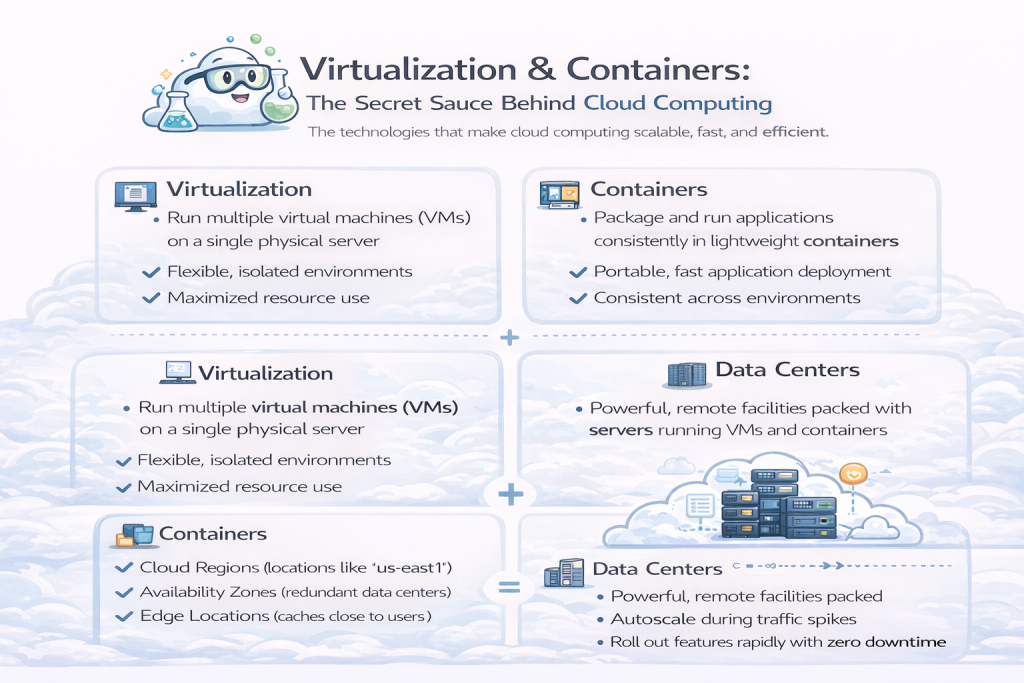
Virtualization and containers are core to understanding how cloud computing fundamentals work behind the scenes.
There were so many moments early in my tech journey where I was deep in cloud projects without realizing how deep. I’d spin up environments, deploy services, and never stop to ask: “Wait… what’s actually powering all this?”
Then the buzzwords started popping up: virtual machines and containers. I figured it was just more IT lingo. I literally remember saying out loud, “What even is a container?” and “Why do folks keep saying virtualization like it’s some mystical force?”
But once I finally sat down and committed to understanding how this stuff worked—by reading docs, poking around in real environments, and reverse-engineering what was under the hood—it clicked.
This isn’t fluff.
This is foundational.
🖥️ Virtualization: The Old Head That Still Runs the Show
Think of virtualization like Airbnb for servers. One physical machine can host multiple “tenants”—aka virtual machines (VMs)—that run side-by-side without bumping into each other.
At one company I worked for, we had call center agents across the globe using Virtual Desktop Infrastructure (VDI). Thousands of agents logged into full desktop experiences daily—all powered remotely from the cloud via VMs. No need to ship hardware. Just log in and go.
The real beauty? Each VM was isolated, scalable, and easy to manage across different departments. It felt like magic, but it was just smart architecture. No wasted hardware. No cross-contamination. Just clean, centralized control.
💡 Pro tip from painful experience: Always snapshot your VM before making changes. I skipped that once—just a “minor” permissions tweak—and ended up locked out, troubleshooting login issues for hours during a major outage. That snapshot? Absolute lifesaver.
📦 Containers: The Power I Didn’t Realize I Was Using
I used to roll my eyes a bit at container hype. Devs tossed around Docker and Kubernetes like seasoning on every cloud convo. Me? I was focused on stability and scaling—not writing Dockerfiles.
Turns out, I was knee-deep in containers the whole time… without knowing it.
When I supported Avaya’s cloud migration, we were moving fast—contact center cutovers, platform hardening, feature rollouts. What powered all those smooth, rapid deployments? Google Kubernetes Engine (GKE)—and yes, containers.
Same with Verint. I wasn’t the one building containers, but their cloud-native architecture? Containerized. Even Avaya Workspaces runs on Docker and Kubernetes for environment consistency and scalability.
Containers are like carry-on luggage for the cloud: app code, dependencies, configs—all bundled into one portable unit that runs exactly the same no matter where you deploy.
💡 Takeaway: You don’t have to be a Kubernetes wizard. But once you understand what containers do and where they show up, your ability to support, scale, and troubleshoot modern platforms levels up fast.
🔁 Virtualization + Containers = Cloud Magic
Virtualization gives you flexibility.
Containers give you speed.
Put ‘em together? You’ve got the backbone of modern cloud computing.
So next time someone asks, “Wait, what is the cloud actually?” you can tell them:
“It’s a bunch of virtual machines and containers chillin’ in a data center somewhere, doing work while you sip your coffee.”
🏢 The Data Center: The Cloud’s Not-So-Secret Backbone
For a long time, I thought “the cloud” was just some magical space in the sky where apps lived.
Turns out, it’s not floating. It’s rack-mounted.
A data center is basically a massive warehouse filled with blinking servers, storage units, networking equipment, and industrial cooling. Picture endless rows of machines quietly powering the internet—and that’s the cloud’s real-world core.
Companies like Google run fleets of these around the globe. Super-efficient. Super-secure. And it’s where all the VM magic, container orchestration, and serverless wizardry happens behind the scenes.
When I supported large-scale deployments with Avaya and Verint, I wasn’t thinking about the physical hardware. I just needed stuff to work. But once I started digging into Google Cloud Platform (GCP) architecture, the smooth performance started to make sense.
Let’s break it down:
🌍 Region, Zone, and Edge—Why the Cloud Feels Instant
- Regions are geographic locations—like
us-east1(South Carolina) orasia-northeast1(Tokyo). - Each region contains multiple zones (separate, independent data centers), so if one zone goes down, others keep the system running. That’s what makes cloud infrastructure resilient.
- Then you have multi-region services like BigQuery and Spanner, which span across regions for global reliability.
- And finally, there’s the edge—tiny data centers placed worldwide to deliver content faster. When a user in London opens your app, they don’t have to wait on a server in Iowa. That’s Cloud CDN doing its thing.
So yeah—virtual machines and containers run the cloud. But data centers are the muscle. The backbone. The real-world metal where all the abstract magic lives.
Next time someone says, “It’s just the cloud,” hit ’em with the truth:
It’s racks, cables, power, fans, regions, zones, and thousands of humming servers working 24/7…
…so you can deploy an app while wearing sweatpants.
Types of Cloud Deployment Models
Understanding deployment models is essential to grasping cloud computing fundamentals in action.
When I first started digging into cloud architecture, I thought cloud was just… well, cloud. Some magical internet space where apps lived and files floated around. I didn’t know where to start, and I definitely didn’t realize there were different types of cloud deployment models—each with its own pros, cons, and “who it’s actually for” checklist.
It wasn’t until I was deep in a real project—trying to get two enterprise platforms to play nice—that I finally understood the nuances.
Let me break them down the way I wish someone had for me back then.
☁ Public Cloud — The “Easy Button”
This is what most people use daily without realizing it: Gmail, Google Drive, Netflix, Dropbox. Public cloud means you’re renting shared infrastructure that anyone on the internet can access (with the right credentials). No servers to manage. No maintenance headaches. No massive upfront spend.
I remember spinning up my first VM on a public platform. It was fast, cheap, and the perfect playground to learn. But here’s the catch: security and compliance.
If you’re handling sensitive data—financial records, healthcare info—public cloud might not tick all the boxes. It’s not that it’s unsafe, but meeting strict regulations is tougher when you don’t fully control the environment.
👉 Use public cloud when speed, cost, and simplicity matter more than strict data controls. Great for startups, testing, personal projects, or apps with low-risk data.
🏢 Private Cloud — The Fort Knox Setup
Private cloud is like building your own gated community in the cloud. Only the people you authorize can get in, and you manage the infrastructure—either in your own data center or through a private host.
I worked with a government contractor that couldn’t touch public cloud due to compliance requirements. We built a private cloud environment where we controlled encryption, access, auditing—the whole stack. It gave us the security we needed, but came with more responsibility too.
👉 Use private cloud when data control, compliance, and privacy are mission-critical. Think: finance, healthcare, or government orgs with zero wiggle room for risk.
🔀 Hybrid Cloud — Best of Both Worlds (If You Can Pull It Off)
Hybrid cloud blends your on-prem systems with cloud infrastructure—so you’re not all-in on either. Maybe your core databases stay local, but your reporting runs in the cloud. Or your front-end sits in a public cloud, while your backend connects to a private system.
It’s a go-to move for companies mid-migration, or anyone with solid on-prem investments they’re not ready to toss out.
👉 Use hybrid cloud when:
- You have valuable on-prem systems you still rely on
- You want to migrate gradually without disruptions
- You need to split workloads across environments based on sensitivity or scale
⚠ Just remember: hybrid isn’t a shortcut. It’s a full-on architecture that requires thoughtful planning—especially when it comes to networking, latency, and access control.
🌐 Multi-Cloud — Because One Cloud Isn’t Enough
Multi-cloud means using two or more cloud providers at the same time—like running apps on AWS and GCP, or storing data in Azure while using AI tools from Google.
One project I worked on had this exact setup. One vendor only supported Azure, and another depended entirely on GCP. We couldn’t pick just one, so we went multi-cloud. It gave us the flexibility we needed—but added complexity around integration, identity management, and monitoring.
And here’s the part no one warns you about…
⚠️ Multi-Cloud Gotcha: When the Cloud Cuts You Off
We once ended a contract with a cloud-based call recording vendor we’d used for years across multiple contact centers. All our call data—millions of files—lived in their cloud.
The day the contract ended, so did our access.
No dashboard. No API. No export button.
And of course, a business unit urgently needed seven years of recordings for compliance. The vendor’s only solution? Loading the data onto a physical hard drive and shipping it to us—like it was 1999.
That moment exposed a brutal truth: in multi-cloud setups, access is not ownership. We depended on that data, but the vendor held the keys the second our agreement expired.
👉 Use multi-cloud when:
- You need exclusive services across providers
- You want to reduce vendor lock-in
- You need resilience in case one provider goes down
🚨 Plan for your exit—not just your uptime.
Always know how you’ll retrieve your data if the relationship ends or policies change. Because sometimes, the cloud just… stops letting you in.
So… Which One Should You Use?
It depends on your priorities:
🛡 Security-first? → Go private or hybrid
💸 Need to save money fast? → Public is your friend
🔄 Need to modernize gradually? → Hybrid lets you move smart
🧰 Need best-in-class tools from different providers? → Multi-cloud all day
Choosing a cloud model isn’t one-size-fits-all. It’s like buying a car. Speed, size, safety, fuel efficiency—it depends on what you need it to do.
If there’s one piece of advice I’d give?
Start with your business needs, not the buzzwords.
The cloud is just a tool. How you use it? That’s what matters.
📦 Ever wondered which cloud model you should start with?
Public, private, hybrid, multi-cloud — it gets confusing fast.
👉 The Blueprint gives you a dead-simple way to choose your first platform and build real-world skills with it.
Key Benefits and Challenges of Cloud Computing
There’s a lot of hype around cloud computing—and honestly, it’s earned. It helps teams scale faster, launch more efficiently, and focus on what they do best without getting bogged down in infrastructure maintenance.
But here’s the other side of the story: cloud can also be overwhelming. It’s evolving constantly, and keeping up with new features, services, and pricing models can feel like drinking from a firehose.
Still, here’s the truth:
For individuals and organizations who take the time to understand cloud computing fundamentals and apply cloud computing concepts, the cloud isn’t just convenient—it’s a game changer.
Let’s break down the real-world benefits and challenges behind adopting cloud computing fundamentals in real-world settings, starting with why so many teams never want to go back.
☁ Benefits of Cloud Computing
(a.k.a. why you’ll never want to go back)
1. Flexibility & Pay-As-You-Go Pricing
Cloud computing is the a la carte buffet of IT. You only pay for what you use—no more buying expensive servers that sit idle most of the year. Plenty of case studies show teams saving thousands by simply rightsizing their compute usage after moving from fixed on-prem setups to elastic cloud environments.
2. No More Babysitting Hardware
As someone who used to manage physical servers, let me say: I don’t miss the 2AM rack reboots. With cloud, the provider handles the plumbing. You focus on shipping features, not fighting failing fans or overheated hardware.
3. Speed to Market
Back in the day, launching an app meant ordering hardware, racking servers, configuring firewalls… and waiting weeks. Now? You can go from idea to production in a day using infrastructure-as-code, containerized apps, and automated pipelines.
4. High Availability by Design
Because of how cloud platforms distribute resources across regions and zones, high availability is baked in. What used to take a whole disaster recovery team is now part of the package. Your app can survive a full data center outage—and your users won’t even notice.
😬 Challenges of Cloud Computing
(Especially for beginners and solo builders)
1. “I’m Not Technical Enough” Syndrome
I’ve been in tech for over a decade—and I still felt this. When I first became a systems engineer, imposter syndrome hit hard. For six months, I thought I didn’t belong. But once I started using the tools daily and leading my own troubleshooting calls, things changed.
You do not have to be a DevOps wizard to get started. If you can follow a tutorial, you can learn cloud. Just start small.
2. Overwhelm & Shiny Object Syndrome
It’s easy to bounce between Lambda, Kubernetes, and BigQuery without ever finishing anything. Don’t do that.
Pick one simple use case—like hosting a static site or spinning up a VM. Stick with it. The fastest path to confidence is hands-on experience with a real project.
3. Misconfigurations & Bill Shock
Yeah… ask me how I learned about auto-scaling without billing alerts in place.
Let’s just say the invoice was educational.
Always set up cost controls, double-check your permissions, and monitor usage—especially when you’re new.
💸 How Cloud Saves Money and Helps You Scale
Cloud isn’t “cheap”—but it eliminates waste, and that’s where the savings come from.
You don’t need to overbuy hardware “just in case.” You don’t need a 10-person ops team just to keep systems running. And you don’t have to guess what your traffic will look like next quarter.
Before cloud, retail giants like Target and Walmart would spend weeks prepping for Black Friday. Now, with auto-scaling groups and serverless compute, most of that work happens in the background. Systems scale as needed, automatically. No more all-nighters. No surprise outages.
Cloud computing is powerful, but not perfect.
If you can get past the initial learning curve—and stay focused on what you need it to do—the benefits are massive:
speed, scale, simplicity, savings.
Best advice I’ve got?
Don’t try to learn it all at once.
Pick a small project. Break it. Fix it. Learn from it.
That’s how every real cloud engineer I know got started and mastered cloud computing fundamentals.
Including me.
🎯 Want to stop guessing and start growing?
The Cloud Career Blueprint gives you a no-fluff certification roadmap — plus hands-on project ideas, free tools, and resume tips to help you stand out.
👉 Grab your free copy now.
Getting Started with Cloud Platforms (GCP, AWS, Azure)
If you’re trying to break into cloud and staring at the logos for GCP, AWS, and Azure thinking, “uhhh… where do I even start?” — trust me, I’ve been there.
Picking your first cloud platform feels like walking into a gym for the first time. There’s fancy equipment everywhere, everyone seems to know what they’re doing, and you’re just trying not to pull something on day one.
So let me break it down the way I wish someone had for me. If you’re ready to apply cloud computing fundamentals, here’s how to choose the right platform.
🧠 GCP vs. AWS vs. Azure — What’s the Difference?
Here’s your real-world cheat sheet—minus the fluff:
- GCP (Google Cloud Platform) – A go-to for data, analytics, AI, and automation. If you’re into tools like BigQuery, TensorFlow, or just love clean UI design, GCP is a solid pick. Great for machine learning projects and data-heavy workflows.
- AWS (Amazon Web Services) – The OG of cloud. It has the largest ecosystem, most services, and the broadest community. Think of it like Costco: huge, well-stocked, sometimes overwhelming, but everything you need is in there. Great for large-scale apps, dev environments, and startups that want to grow fast.
- Azure – Built by Microsoft, Azure feels like a natural extension of Office 365, Active Directory, and SharePoint. If you’re working in a company that’s already deep in the Microsoft ecosystem, this is the most seamless option. Enterprise-friendly and compliance-heavy.
💸 How to Get Free Accounts (Without Getting Billed)
Here’s the best part—you can learn cloud without spending a dime. Every major provider offers free resources and starter credits.
- Google Cloud (GCP): Always-free tier + $300 in credits. The best part? They don’t auto-bill when your trial ends. You stay safe.
- AWS: 12-month free tier with services like EC2, S3, and Lambda. Just be careful not to exceed usage—AWS will charge you if you go over.
- Azure: Free tier + $200 in credits. Requires a credit card for verification, but you get access to plenty of core services for learning.
💡 Pro tip: Set up billing alerts. I’ve seen more than one beginner panic after spinning up a pricey VM and forgetting to shut it down overnight. (Been there.)
🤔 Which One Should You Start With?
Honestly? It doesn’t matter that much.
Pick one based on:
- What interests you
- What’s used at your job (or dream job)
- Which ecosystem you already know (Microsoft, Google, Amazon, etc.)
I started with AWS because that’s what my team used. Later, I focused on GCP when I moved into data-focused work. Once you understand the fundamentals—compute, storage, networking, identity—you can switch platforms pretty easily.
Virtual machines are virtual machines. IAM is IAM. It’s mostly branding and interface.
🛠️ Your Action Plan
Here’s how to actually get started:
- Pick a platform based on your goals or job market.
- Create a free account and poke around the dashboard.
- Start small — deploy a Python app, launch a virtual machine, or explore Cloud Shell.
- Break stuff. Fix it. Learn. Repeat.
That’s how every cloud engineer got started.
Not with a fancy cert.
Not with a bootcamp.
Just with a free account, a simple project, and the guts to click “Deploy.”
And hey—if you accidentally delete something? Don’t worry.
The cloud has backups.
Probably. 😉
💡 Pro Tip: Hands-on projects are the fastest way to apply cloud computing fundamentals in real-world scenarios.
🛠️ No idea which cloud platform to pick — or how to avoid billing mistakes?
I’ve been there. That’s why I made a cheat sheet inside the Cloud Career Blueprint that shows you how to:
- Pick the right provider
- Get free hands-on access
- Set up alerts to avoid surprise bills
👉 Download it here and start with confidence.
Certifications and Learning Paths for Beginners
Let me tell you a secret most folks won’t say out loud:
There’s no perfect certification path into cloud. Seriously. However, certifications can be a vital tool to help validate your understanding of cloud computing fundamentals—and they get you hired.
If you’re a career switcher or just starting out, the right path depends more on where you’re coming from than where you want to go. And trust me—I’ve walked a few different paths before I figured out what actually worked.
🧱 Start with the Basics (Especially If You’re Brand New to Tech)
If terms like IP address or DNS still sound like a secret code, don’t stress. You’re not behind—you just need a solid foundation.
I always recommend starting with:
- CompTIA A+ – Teaches you how computers and hardware actually work
- CompTIA Network+ – Explains how devices talk to each other across networks
Why start here? Because most cloud issues are just networking problems in disguise. I once spent hours troubleshooting what seemed like a cloud outage—it turned out to be a misconfigured firewall rule. Classic.
💡 You can’t skip the fundamentals. The cloud builds on them.
☁️ Next Up: Intro to Cloud
Once you’re confident in the basics, move into beginner-level cloud certs. You’ve got two great options:
- Vendor-neutral:
- CompTIA Cloud+ – Great if you want a broad, foundational view
- Vendor-specific:
- AWS Cloud Practitioner
- Azure Fundamentals (AZ-900)
- Google Cloud Digital Leader
These are beginner-friendly and give you the language of cloud:
VMs, IAM, object storage, serverless, and more.
I started with AWS because that’s what my job needed. Later, I pivoted to GCP. And here’s the cool part: once you understand one cloud, the rest get easier. The concepts are nearly identical—the platforms just brand them differently.
👉 Want a simpler breakdown of what cloud computing is, how it works, and where it shows up in real life? Check out this post for a beginner-friendly explainer.
💼 How Certs Help with Jobs and Salary (But Only If You Use Them Right)
Certifications help you open doors, but they don’t guarantee jobs.
What makes the difference? How you apply what you’ve learned—and how you tell that story to employers.
When I talk in interviews about cloud migrations I’ve worked on, I don’t just answer questions—I explain how I solved real problems using real tools.
Here’s how to make your certs matter:
- Do the labs. Build things. Don’t just memorize slides.
- Use free cloud tiers to create your own test environments
- Keep a simple portfolio of what you’ve built (screenshots, notes, even GitHub repos)
- Practice teaching cloud concepts in plain English—as if you’re explaining them to a 5th grader
💡 Interviews are sales. Stories sell. Not just cert logos.
📚 Where to Learn (Free and Paid)
Here are some top resources—whether you’re learning on a budget or ready to invest:
Free:
- Google Cloud Training (Qwiklabs, Cloud Skills Boost)
- AWS Skill Builder
- Azure Fundamentals Learning Path
- Cisco Networking Basics – via Skills for All
- YouTube – Check out NetworkChuck, FreeCodeCamp, The Cloud Coach
Paid (but worth it):
- Udemy – Look for courses by Stephane Maarek or Andrew Brown
- Coursera – Great for guided learning paths with cert options
- A Cloud Guru – Amazing for hands-on labs and sandbox projects
- O’Reilly – Full library of books, videos, and scenarios (often free via work or library card)
(I’ll be dropping affiliate links here soon—helps support the blog and gets you some nice discounts.)
🚀 Final Tip: Cert + Project + Story = Hired
Don’t overthink it. Just:
- Pick a cert
- Commit to it
- Build something while you’re learning
- Break stuff, fix it, and share what you did
That combo—certification + hands-on experience + clear storytelling—is what gets you noticed.
No one’s hiring “perfect.”
They’re hiring people who learn, build, and communicate clearly.
You got this. 👊
🚀 New to tech and not sure where to begin?
Check out Cloud Computing for Beginners: Start Here — it’s a simple, no-fluff breakdown designed to help total beginners get started with confidence (no experience required).
Real-World Use Cases of Cloud Computing

This is where cloud computing fundamentals come alive, powering everything from startups to hospitals.
When most people think about the cloud, they picture it as some digital dumping ground for photos or a place to run basic websites.
But once I started working on real cloud migrations and enterprise integrations—and yeah, even gaming on my Xbox—I realized how deep it really goes.
Cloud computing fundamentals aren’t just about storage or speed. They’re about scale, agility, and building things that would’ve been impossible a decade ago without a massive budget and a warehouse full of servers.
Let’s break down how different types of businesses use the cloud—and why it’s now the go-to infrastructure for nearly everything.
🚀 Startups — Move Fast, Don’t Break the Bank
Startups live and die by speed. They don’t have time—or money—to spin up physical servers, patch operating systems, or babysit hardware.
That’s where the cloud shines.
👉 Startups use cloud computing to build fast, iterate quickly, and stay lean while testing and validating new ideas—all without major upfront costs.
🏢 Enterprises — Evolve or Die
Big companies might have resources, but they often lack agility. Cloud helps them change that.
Whether it’s launching features faster, syncing systems across global offices, or modernizing legacy software, enterprise teams rely on cloud infrastructure to stay competitive—without tearing down what already works.
👉 Enterprises use the cloud to modernize at scale, integrate old and new systems, and offload infrastructure management to trusted platforms.
🧑🏾💼 Small Businesses — Big Tech, Small Budget
For small businesses, cloud computing for beginners isn’t just helpful—it’s a secret weapon.
You can run your entire operation using cloud-based tools:
CRM, payroll, inventory, marketing automation—even e-commerce and shipping. I’ve seen local shops run Shopify on the front end, Google Workspace for internal ops, and AWS Lambda functions on the backend—no full-time IT staff needed.
👉 Small businesses use the cloud to look bigger than they are, operate remotely, and scale without spending like an enterprise.
🏥 What Industries Benefit Most? (Spoiler: All of Them)
The beauty of cloud computing is that every industry can benefit—each in its own way.
- Tech companies: Scaled faster using infrastructure-as-code and serverless compute
- Banks: Found secure, compliant platforms for customer apps and data
- Retailers: Handled peak-season traffic with auto-scaling and cloud load balancing
- Healthcare: Synced patient data securely across providers and platforms
- Education: Went remote almost overnight using tools built entirely in the cloud
- Entertainment: From Netflix to Spotify, they stream globally with high availability and low latency
👉 If you’re wondering what is cloud computing really good for—just look at how it’s reshaped every major sector.
📺 How Apps Like Netflix, Zoom, and Snapchat Use Cloud
Ever binged an entire season of a show without buffering? That’s the cloud in action.
Apps like Netflix, Spotify, Zoom, and Snapchat are all built on cloud-native platforms like AWS, GCP, and Azure. Here’s what that enables them to do:
- Stream and serve millions of users simultaneously
- Autoscale servers during traffic spikes
- Roll out new features with zero downtime
- Focus on building great experiences—not managing infrastructure
Most of these platforms use Kubernetes (like GKE) to orchestrate thousands of containers, apply rolling updates, and maintain high uptime. Real-time services like Snapchat use the cloud to instantly process media, sync data, and secure everything behind the scenes.
👉 These companies rely on cloud computing fundamentals to stay fast, global, and relentlessly user-focused.
Cloud isn’t the future anymore—it’s the foundation.
And once you understand how it powers the apps you use every day, it’s hard not to get excited about what you could build with it, too.
If you’re exploring cloud computing for beginners, don’t just study theory.
Get hands-on. Start small. Break things. Build things.
That’s where the real learning begins.
Cloud Computing Fundamentals FAQs
When I first started learning about cloud, I had a million questions. I’d scroll through Reddit threads, binge YouTube videos, and still feel like something wasn’t clicking.
So I put this FAQ together based on the most common questions I get—especially from career switchers and beginners who are just starting their cloud journey. If you’ve ever wondered about the real-life path to understanding cloud computing fundamentals, this section’s for you.
🤔 Do I Need to Know How to Code to Get Into Cloud Computing?
Short answer: nope.
This is one of the biggest myths around cloud. You don’t need to be a developer to break into cloud computing.
There are plenty of roles—cloud support, cloud security, project management, and even solutions architecture—that rely more on systems thinking and infrastructure knowledge than coding, especially when applying cloud computing fundamentals in beginner-friendly roles.
That said, knowing a little scripting (like Bash or Python) can give you an edge. Think of it like driving stick shift: you don’t need it for most jobs, but when you do—it’s clutch. (Pun intended.)
⏳ How Long Does It Take to Get Cloud Certified?
It depends—but here’s a realistic breakdown.
Some people knock out their first certification in 30 days, especially if they’re between jobs and treating it like full-time study. Others take 3–6 months, especially if they’re juggling work, family, and life in general.
What matters most is consistency—especially as you’re learning the basics of cloud computing fundamentals and trying to build real confidence.
Here’s the approach that worked for me:
- Pick a beginner-friendly cert (like AWS Cloud Practitioner or GCP Digital Leader)
- Set a target exam date
- Build a simple daily study plan (even 1 hour a day adds up)
- Track your progress weekly
- Expect to fall off—just restart the next day
You don’t have to be perfect. You just have to keep going.
🛠 What’s the Best Way to Get Hands-On Practice?
Forget cramming theory like it’s a college exam. The best way to learn cloud computing fundamentals is to get your hands dirty.
Here’s how to start:
- Choose a cloud provider: AWS, GCP, or Azure
- Take their free fundamentals course—they usually include short videos, light quizzes, and interactive labs
- Dive into hands-on labs using platforms like AWS Skill Builder, Qwiklabs, or Azure Learn
- Build mini-projects—like deploying a VM, hosting a static site, or creating a cloud storage bucket
Personally, I like courses that blend visual explanations with real-time demos when teaching cloud fundamentals. Platforms like in28minutes on Udemy are great for that (affiliate link coming soon).
💡Pro Tip: Every time you learn something, build something small with it—even if it’s just a sandbox setup. That’s valuable real-world experience applying cloud computing fundamentals. Those small wins become interview talking points and major confidence boosters as you grow.
Don’t let the cloud intimidate you. You don’t need to code. You don’t need to study for years. You don’t need to spend thousands of dollars.
You just need to start, stay consistent, and build as you go.
If you stay consistent and apply cloud computing fundamentals step by step, everything else will follow.
Conclusion
Cloud computing isn’t just for hoodie-wearing engineers or Silicon Valley tech bros—it’s for anyone ready to tap into one of the most transformative tools of the digital age. Mastering cloud computing fundamentals gives you a launchpad into one of the fastest-growing tech sectors.
Whether you’re switching careers, leveling up your current skills, or just curious about cloud computing fundamentals, this space is wide open. The cloud gives you access to on-demand infrastructure, automation that works while you sleep, and the ability to build scalable systems without racks of servers in your garage.
By now, you’ve got the essentials:
- ✅ What is cloud computing (and what it’s not)
- ✅ A beginner-friendly breakdown of cloud computing fundamentals
- ✅ The core cloud service and deployment models
- ✅ Real-world use cases that bring cloud computing for beginners to life
- ✅ Entry-level learning paths and certification tips
- ✅ How to get free hands-on experience with cloud computing for beginners
So… what’s next?
- Pick a provider—AWS, GCP, Azure, whatever fits your interest or goals
- Create your free account
- Launch your first lab or mini-project
- Maybe grab a beginner certification to boost your momentum
Most importantly? Don’t wait. Don’t overthink it. Just start.
Because once you take that first step, you’ll realize this space isn’t just for the pros. It’s for learners, builders, and tinkerers—people just like you.
The cloud is the new frontier.
Now’s your chance to make it yours. 🚀
Frequently Asked Questions: Cloud Computing Fundamentals
Getting Started with Cloud Computing Fundamentals
Q: What are cloud computing fundamentals and why do they matter?
A: Cloud computing fundamentals are the core concepts that explain how modern cloud technology works—including compute, storage, networking, and service models like IaaS, PaaS, and SaaS. Understanding cloud computing fundamentals matters because they form the foundation for every cloud-based application, from Netflix to enterprise systems. Cloud computing fundamentals help you speak the language of tech teams, make informed infrastructure decisions, and open doors to high-paying cloud careers. Whether you’re exploring cloud computing fundamentals as a beginner or preparing for your first cloud certification, these concepts are your starting point for everything else in the cloud ecosystem.
Q: Do I need technical experience to learn cloud computing fundamentals?
A: No. Cloud computing fundamentals are designed to be accessible to non-technical people. You don’t need a computer science degree or coding background to grasp cloud computing fundamentals. Many cloud computing fundamentals courses explain concepts using real-world examples—like how Google Drive stores files or how Zoom handles millions of users. Cloud computing fundamentals focus on understanding what the cloud does and how it works, not writing complex code. Start with beginner-friendly cloud computing fundamentals resources that avoid jargon, and you’ll build confidence quickly even without prior tech experience.
Q: How long does it take to learn cloud computing fundamentals?
A: Most people can learn cloud computing fundamentals in 2–6 weeks with consistent study. Cloud computing fundamentals courses typically require 20–40 hours of total study time, depending on your pace and prior knowledge. If you’re balancing work or family while learning cloud computing fundamentals, expect 2–3 months to feel confident. Cloud computing fundamentals become easier when you combine learning with hands-on practice—like spinning up a virtual machine or deploying a simple app. The key to mastering cloud computing fundamentals isn’t speed—it’s consistency and actually building things as you learn.
Q: What are the most important cloud computing fundamentals to master first?
A: The most critical cloud computing fundamentals include understanding compute (virtual machines and processing power), storage (where data lives), and networking (how systems connect securely). Cloud computing fundamentals also cover the three main service models—IaaS, PaaS, and SaaS—which determine how much control you have versus how much the provider manages. Learning cloud computing fundamentals means grasping deployment models like public, private, and hybrid cloud. Start with these core cloud computing fundamentals, then explore specialized topics like containerization, serverless computing, and cloud security as you grow.
Cloud Computing Fundamentals in Practice
Q: How do cloud computing fundamentals apply to real-world jobs?
A: Cloud computing fundamentals power careers in cloud support, solutions architecture, DevOps, project management, and technical account management. Understanding cloud computing fundamentals helps you troubleshoot infrastructure issues, explain cloud services to customers, and design scalable systems. Cloud computing fundamentals are the baseline knowledge recruiters look for when hiring for cloud roles—even entry-level positions. When you can explain cloud computing fundamentals clearly in interviews and apply them to solve business problems, you stand out. Cloud computing fundamentals aren’t just theory—they’re practical skills employers pay premium salaries for.
Q: What’s the difference between learning cloud computing fundamentals and getting certified?
A: Learning cloud computing fundamentals gives you the knowledge, while certifications validate that knowledge officially. Cloud computing fundamentals can be learned through free resources, hands-on labs, and self-study. Certifications like AWS Cloud Practitioner or Google Cloud Digital Leader test your understanding of cloud computing fundamentals through exams. Many people study cloud computing fundamentals first, then pursue certification to prove their skills to employers. Cloud computing fundamentals are essential regardless of certification—but combining cloud computing fundamentals with a recognized cert dramatically improves your job prospects and earning potential.
Q: Can I apply cloud computing fundamentals without being a developer?
A: Absolutely. Cloud computing fundamentals are valuable for non-developers in roles like project coordination, customer success, sales engineering, and technical writing. Understanding cloud computing fundamentals helps you communicate with technical teams, manage cloud migrations, and support customers effectively. Cloud computing fundamentals don’t require coding—they require understanding how infrastructure works and how to apply cloud services to solve problems. Many successful cloud professionals use cloud computing fundamentals daily without writing a single line of code. Focus on learning cloud computing fundamentals concepts, not programming, and you’ll find plenty of career opportunities.
Q: Where can I practice cloud computing fundamentals hands-on for free?
A: You can practice cloud computing fundamentals for free using Google Cloud Free Tier ($300 credits), AWS Free Tier, or Azure Free Account. Platforms like Qwiklabs (Google Cloud Skills Boost) offer free guided labs where you apply cloud computing fundamentals in real cloud environments. Cloud computing fundamentals become real when you actually build things—like launching virtual machines, creating storage buckets, or deploying simple apps. Start with cloud computing fundamentals tutorials on YouTube, then practice using free cloud platforms. Hands-on experience with cloud computing fundamentals is more valuable than just reading documentation or watching videos passively.
Advanced Cloud Computing Fundamentals Questions
Q: How do cloud computing fundamentals relate to virtualization and containers?
A: Virtualization and containers are core cloud computing fundamentals that enable multiple isolated environments on shared hardware. Cloud computing fundamentals explain that virtual machines (VMs) run full operating systems on virtualized hardware, while containers package apps with their dependencies for faster, lighter deployment. Understanding these cloud computing fundamentals helps you grasp how cloud providers like AWS, GCP, and Azure deliver scalable infrastructure. Cloud computing fundamentals around virtualization and containers power everything from enterprise contact centers to modern microservices architectures. Mastering these cloud computing fundamentals prepares you for advanced topics like Kubernetes and serverless computing.
Q: What cloud computing fundamentals should I know about security and compliance?
A: Cloud computing fundamentals around security include Identity and Access Management (IAM), encryption, firewalls, and VPCs (Virtual Private Clouds). Cloud computing fundamentals teach you that security is a shared responsibility—cloud providers secure the infrastructure, while you secure your data and access controls. Cloud computing fundamentals also cover compliance frameworks like HIPAA, GDPR, and SOC 2, which matter for regulated industries. Understanding cloud computing fundamentals around security helps prevent costly misconfigurations and data breaches. Even beginners learning cloud computing fundamentals should prioritize security concepts from day one—it’s not optional.
Q: How do cloud computing fundamentals differ across AWS, GCP, and Azure?
A: Cloud computing fundamentals are conceptually identical across AWS, GCP, and Azure—compute, storage, networking, and service models work the same way. Cloud computing fundamentals just use different names and interfaces on each platform. For example, cloud computing fundamentals around virtual machines are called EC2 on AWS, Compute Engine on GCP, and Virtual Machines on Azure. Once you learn cloud computing fundamentals on one platform, transferring to another is straightforward. Cloud computing fundamentals focus on understanding what services do, not memorizing brand-specific terminology. Start learning cloud computing fundamentals on whichever platform your job or interest requires—the core principles transfer universally.
Q: What cloud computing fundamentals certifications should beginners pursue?
A: The best cloud computing fundamentals certifications for beginners include AWS Certified Cloud Practitioner, Google Cloud Digital Leader, and Microsoft Azure Fundamentals (AZ-900). These cloud computing fundamentals certifications require no prerequisites and validate your understanding of core cloud concepts. Cloud computing fundamentals certifications typically take 2–6 weeks of study and significantly boost your resume. CompTIA Cloud+ is a vendor-neutral cloud computing fundamentals certification that covers general cloud knowledge across all platforms. Cloud computing fundamentals certifications prove to employers you understand the basics and are ready to contribute—even without years of experience.
Cloud Computing Fundamentals Career Questions
Q: What jobs can I get by mastering cloud computing fundamentals?
A: Mastering cloud computing fundamentals opens doors to roles like Cloud Support Associate, Technical Account Manager, Solutions Architect, DevOps Engineer, and Cloud Security Specialist. Cloud computing fundamentals are also valuable for Project Managers, Customer Success roles, and Sales Engineers supporting cloud products. Cloud computing fundamentals alone can land you entry-level positions paying $50,000–$75,000 annually. As you deepen your cloud computing fundamentals knowledge with certifications and experience, salaries increase to $100,000–$150,000+ for mid-level and senior roles. Cloud computing fundamentals are the foundation for one of the highest-paying, fastest-growing career paths in tech.
Q: Do employers value cloud computing fundamentals certifications?
A: Yes. Employers value cloud computing fundamentals certifications because they validate your knowledge and show initiative. Cloud computing fundamentals certifications like AWS Cloud Practitioner or GCP Digital Leader prove you understand core concepts without requiring years of experience. Cloud computing fundamentals certifications help you pass recruiter screenings, especially when you lack traditional tech credentials. However, cloud computing fundamentals certifications work best when combined with hands-on projects and clear storytelling in interviews. Cloud computing fundamentals certifications open doors—but real-world experience applying cloud computing fundamentals is what gets you hired and promoted.
Q: How can I stand out when learning cloud computing fundamentals?
A: Stand out by building real projects while learning cloud computing fundamentals. Don’t just watch tutorials—apply cloud computing fundamentals by hosting a website, deploying a VM, or creating a cloud storage solution. Document your cloud computing fundamentals projects with screenshots, GitHub repos, or blog posts explaining what you built and why. Cloud computing fundamentals become interview-ready stories when you can explain how you solved real problems using cloud services. Combine cloud computing fundamentals certification with hands-on experience and strong communication skills. That combination—cloud computing fundamentals knowledge + projects + storytelling—is what makes you memorable to hiring managers.
Q: What’s the fastest way to go from cloud computing fundamentals to a paid role?
A: The fastest path from cloud computing fundamentals to a paid role involves three steps: learn core cloud computing fundamentals concepts, earn a beginner certification, and build 2–3 hands-on projects you can discuss in interviews. Focus cloud computing fundamentals study on one platform (AWS, GCP, or Azure) to avoid overwhelm. Apply cloud computing fundamentals immediately by creating real-world demos—even simple ones like deploying a static website or setting up IAM roles. Cloud computing fundamentals combined with a certification and portfolio typically land interviews within 3–6 months. Network with cloud professionals, join communities, and share your cloud computing fundamentals learning journey publicly to accelerate opportunities.
Practical Cloud Computing Fundamentals Tips
Q: What are common mistakes when learning cloud computing fundamentals?
A: Common mistakes when learning cloud computing fundamentals include trying to learn everything at once, studying theory without hands-on practice, and platform-hopping between AWS, GCP, and Azure. Many beginners learning cloud computing fundamentals skip networking basics, leading to confusion about VPCs, subnets, and firewalls later. Another mistake is ignoring cost management when practicing cloud computing fundamentals—forgetting to shut down VMs or set billing alerts can result in surprise charges. Focus on mastering core cloud computing fundamentals on one platform, build real projects, and always monitor your cloud spending while learning.
Q: Should I learn cloud computing fundamentals before or after learning to code?
A: You can learn cloud computing fundamentals before, after, or alongside coding—there’s no required order. Cloud computing fundamentals don’t depend on coding skills, especially for roles in cloud support, project management, or technical account management. However, learning basic scripting (Python or Bash) enhances your cloud computing fundamentals toolkit and unlocks more advanced roles. Many people master cloud computing fundamentals first, then add coding skills as needed. Cloud computing fundamentals focus on infrastructure concepts—how systems work, scale, and connect. Coding helps you automate cloud computing fundamentals tasks, but it’s not mandatory for getting started.
Q: How do cloud computing fundamentals connect to modern technologies like AI and machine learning?
A: Cloud computing fundamentals underpin AI and machine learning by providing the scalable infrastructure these technologies require. Cloud computing fundamentals like compute resources (GPUs/TPUs), storage for massive datasets, and networking for distributed training power AI workloads. Platforms like Google Cloud AI, AWS SageMaker, and Azure Machine Learning are built on cloud computing fundamentals—offering managed services so data scientists focus on models, not infrastructure. Understanding cloud computing fundamentals helps you support AI initiatives, deploy ML models, and scale intelligent applications. Cloud computing fundamentals are the foundation—AI and ML are powerful applications built on top.
Q: What’s the ROI of learning cloud computing fundamentals?
A: The ROI of learning cloud computing fundamentals is substantial—entry-level cloud roles pay $50,000–$75,000, while experienced cloud professionals earn $100,000–$150,000+. Cloud computing fundamentals certifications cost $100–$300 and take 2–6 weeks to earn, making them one of the most cost-effective tech credentials available. Cloud computing fundamentals knowledge is transferable across industries—healthcare, finance, retail, government, and tech all need cloud talent. Learning cloud computing fundamentals future-proofs your career as more companies migrate to the cloud. Cloud computing fundamentals offer high earning potential, job security, remote work opportunities, and career flexibility—making them one of the smartest investments in your professional development.
Next Steps After Cloud Computing Fundamentals
Q: What should I learn after mastering cloud computing fundamentals?
A: After mastering cloud computing fundamentals, specialize in areas like cloud security, DevOps and CI/CD pipelines, cloud-native development, or data engineering in the cloud. Build on cloud computing fundamentals by earning intermediate certifications like AWS Solutions Architect Associate or Google Associate Cloud Engineer. Cloud computing fundamentals prepare you for advanced topics like Kubernetes orchestration, serverless architectures, and infrastructure-as-code with Terraform. Deepen cloud computing fundamentals knowledge by working on complex projects, contributing to open source, or pursuing hands-on roles that challenge you daily. Cloud computing fundamentals are just the beginning—your specialization path depends on your interests and career goals.
Q: How do I stay current with cloud computing fundamentals as the technology evolves?
A: Stay current with cloud computing fundamentals by following cloud provider blogs (AWS News, Google Cloud Blog, Azure Updates), joining cloud communities on Reddit and Discord, and taking refresher courses annually. Cloud computing fundamentals evolve as providers release new services and deprecate old ones. Revisit cloud computing fundamentals documentation quarterly to catch updates. Practice cloud computing fundamentals hands-on regularly—even if you’re employed—to keep skills sharp. Subscribe to cloud newsletters, attend virtual conferences, and network with other cloud professionals. Cloud computing fundamentals require continuous learning, but staying engaged with the ecosystem ensures your knowledge remains relevant and valuable.
Q: Can cloud computing fundamentals help me transition from a non-tech career?
A: Absolutely. Cloud computing fundamentals are perfect for career switchers because they don’t require years of technical background. Cloud computing fundamentals can be learned while working full-time, making them ideal for gradual transitions. Many non-tech professionals leverage cloud computing fundamentals to move into technical roles—teachers become cloud trainers, sales reps become solutions engineers, and project managers become cloud architects. Cloud computing fundamentals provide a clear learning path with certifications that validate your skills quickly. Start with cloud computing fundamentals, build a portfolio of small projects, and network with cloud professionals. Cloud computing fundamentals are your bridge from non-tech to tech—thousands have made this transition successfully.
Q: Where can I find a complete cloud computing fundamentals roadmap?
A: A complete cloud computing fundamentals roadmap should include core concepts (compute, storage, networking), service models (IaaS, PaaS, SaaS), deployment models (public, private, hybrid), hands-on practice with free cloud tiers, and beginner certifications. Cloud computing fundamentals roadmaps guide you step-by-step from zero knowledge to job-ready skills. Look for cloud computing fundamentals resources that combine theory with practical projects—like deploying VMs, configuring IAM, and building simple cloud applications. Many cloud computing fundamentals roadmaps are available free through provider documentation, online communities, and tech blogs. Choose a cloud computing fundamentals roadmap that matches your learning style and career goals, then commit to consistent daily progress.
💡 Related Reading:
👉 7 Powerful Benefits of Cloud Computing Explained
👉 Cloud Regions and Zones Explained for Beginners
👉 What Is Elasticity in Cloud Computing?
🚀 Want a Clear Plan to Start Your Cloud + AI Career?
Download the free Cloud Career Blueprint — a step-by-step guide to help you learn the right skills, avoid overwhelm, and start building a high-value career in tech.
👉 Just enter your email below and I’ll send it straight to your inbox.