
Cloud Computing Basics Demystified: A Clear, Step-by-Step Beginner Guide
Cloud computing basics confuse a lot of smart people. I know that because I was one of them. And if I’m being honest, I still get confused sometimes.
At some point, almost everyone in tech or tech-adjacent work hits the same wall. You hear people throwing around terms like managed servers, source IP addresses, and horizontal scaling, and you nod along like it all makes sense. But in your head, you’re thinking: I kind of get it… but I don’t really get it.
That gap is exactly what this article is here to fix.
When most people search for cloud computing basics, they’re not trying to become a cloud architect overnight. They want a clear explanation. They want to understand what cloud computing actually is, how it works at a high level, and why it matters to them personally. No jargon. No sales pitch. Just clarity.
If you want a deeper, structured walkthrough after this, I break everything down step by step in my main guide here: 👉 Cloud Computing Fundamentals
Here’s the promise of this article.
By the time you finish reading, you’ll be able to explain cloud computing basics in plain English to someone else. You’ll understand why cloud shows up everywhere, even when you don’t notice it. And you’ll know what to focus on next without feeling overwhelmed or behind.
This isn’t a vendor comparison. It isn’t a certification cram guide. It’s the mental model I wish I had when I was first trying to make sense of cloud computing basics and wondering if I was already too late to learn it.
You’re not late. You just need the right explanation.
What Cloud Computing Actually Means (In Plain English)
Here’s how I explain cloud computing basics to people who are not technical.
Cloud computing is the ability to use very powerful computers over the internet instead of owning them yourself. These computers live in massive data centers around the world. You access them from your laptop, phone, or tablet, run applications, store data, or process information, and then log out when you are done.
That’s it. That’s the core idea behind cloud computing.
Most confusion comes from the fact that you never see the hardware. There is no server sitting in your office. No blinking lights. No loud fans humming in the background. Everything feels abstract, so people assume it must be complicated. In reality, the concept is often simpler than traditional IT setups. It just feels unfamiliar because it is out of sight.
One of my favorite examples is cloud gaming. With services like Xbox Cloud Gaming, you can play a game like Call of Duty from almost any device without installing it. The game is not running on your laptop or console. It is running on a powerful machine somewhere else. Your device, whether it is a console, laptop, or even an iPad with a controller, is just streaming the experience. Guilty.
Once people understand that example, basic cloud concepts usually start to click.
Where many beginner explanations go wrong is that they focus too much on definitions instead of intuition. You will hear phrases like distributed systems or virtualized infrastructure thrown around early. Those concepts matter later, but they are not where beginners should start. Most people are not confused by the idea of renting something. They are confused about where to begin, which services to use, and what actually matters. They want to know when to use something, why to use it, and what tradeoffs they are making when they choose one option over another.
Another way to think about cloud computing basics is to compare it to a gym membership. Instead of buying a gym and filling it with equipment yourself, you pay a monthly fee. You show up, use what you need, and leave. You do not worry about maintenance, repairs, or upgrades. If you need heavier weights, the gym already has them.
The cloud works the same way, just with computing power instead of treadmills. If you need more computing power, it scales up. If demand spikes, it scales up again. When demand drops, it scales back down. This ability to grow and shrink based on need is called elasticity, and it is one of the core components of cloud computing.
If you want more beginner-friendly examples that connect cloud concepts to everyday tools people already use, this guide expands on that idea nicely: 👉 Cloud Computing for Beginners
One important thing to understand early is that cloud computing basics are not only about memorizing tools. Yes, there are a lot of services and options. But at its core, cloud is a mindset shift. You move from owning things to accessing things on demand. Once you see that pattern, cloud concepts start showing up everywhere.
This is also why cloud feels overwhelming at first. Cloud platforms are designed to be flexible. Flexibility is powerful once you understand the basics. Before that, it can feel like chaos.
The good news is you do not need to understand everything at once. If you understand that cloud computing is mostly about renting computing power over the internet and scaling it based on demand, you are already ahead of where most people start.
Everything else builds on that foundation.
How Cloud Computing Works at a High Level
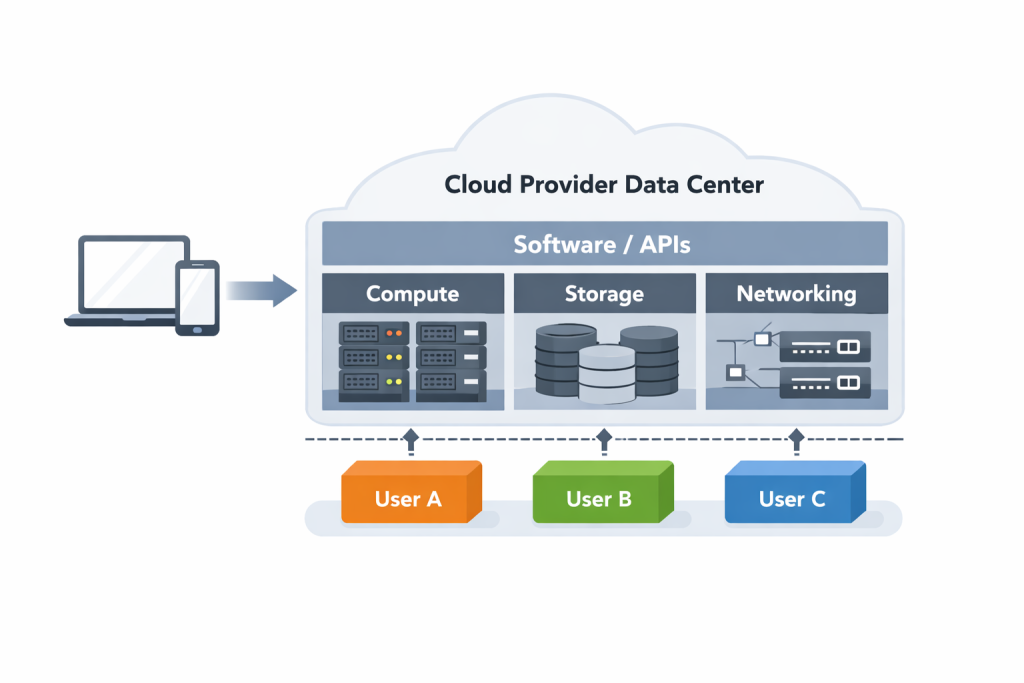
Once you understand what cloud computing basics mean conceptually, the next question is always the same. How does this actually work behind the scenes?
This part used to confuse me more than anything else, mostly because explanations jumped straight into diagrams and acronyms. The breakthrough came when I stopped thinking about cloud as “technology” and started thinking about it as a system.
At a high level, cloud computing works by moving the heavy lifting away from your device and into large data centers operated by cloud providers. These data centers are filled with physical servers, networking equipment, and storage systems. You do not interact with that hardware directly. Instead, software sits on top of it and lets you request exactly what you need through a web console or an API.
When you spin up a virtual machine, run an app, or store files in the cloud, you are not getting a brand-new physical server. You are getting a slice of shared infrastructure that has been logically separated just for you. That separation is what makes cloud feel personal even though it is shared underneath.
This is where cloud computing basics really start to feel different from traditional IT.
In the old model, if you needed more capacity, you had to plan weeks or months ahead. You bought hardware, waited for it to arrive, installed it, configured it, and hoped demand did not change. In the cloud, capacity is already there. You are simply turning it on or off as needed.
A simple way to think about this is through a sports analogy. Imagine a basketball team renting a practice facility. The court, lights, locker rooms, and equipment already exist. When the team shows up, everything is ready. If more players arrive, more space is allocated. If fewer players show up, unused space goes away. The team never worries about building the gym or maintaining it. They just practice.
Cloud computing works the same way. Servers are the players. Storage is the locker room. Networking is the court that connects everything together. You focus on playing the game, not running the facility.
Another key concept behind cloud computing basics is automation. Most cloud systems are designed to respond automatically to changes. If traffic to an application increases, more computing resources can be added without human intervention. If demand drops, those resources are released. This is not magic. It is software constantly measuring usage and adjusting capacity in real time.
This automation is why cloud feels fast and flexible. It is also why beginners sometimes feel overwhelmed. There are many moving parts working together, even though the interface looks simple.
What helps is remembering this. At a high level, cloud computing basics come down to three things working together. Compute, which runs your applications. Storage, which holds your data. And networking, which connects everything. Every cloud service you encounter is built on some combination of those three building blocks.
You do not need to master them all at once. Understanding that they exist and how they interact is enough to move forward.
Once this mental model clicks, the cloud stops feeling mysterious. It becomes a system you can reason about, explore, and learn piece by piece instead of something you are expected to understand all at once.
The 3 Core Cloud Service Models (IaaS, PaaS, SaaS)
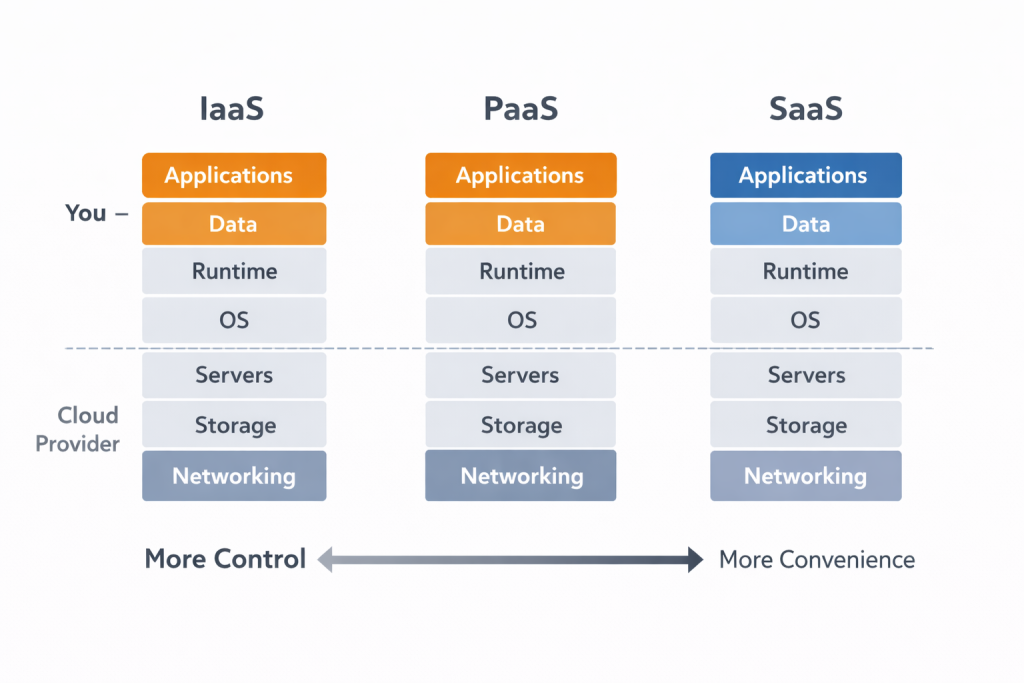
Once cloud computing basics start to make sense, the next thing people run into is a wall of acronyms. IaaS. PaaS. SaaS. They sound technical, but the ideas behind them are actually very simple once you look at them the right way.
The easiest way to understand these models is to realize they all answer the same question differently:
How much do you want to manage yourself?
Infrastructure as a Service (IaaS)
IaaS is the most hands-on cloud service model.
With IaaS, the cloud provider gives you raw computing resources. Virtual machines, storage, and networking. You are responsible for what runs on top of it.
A good analogy here is renting an empty apartment.
The building exists. The electricity works. The plumbing is already there. But once you get the keys, everything inside is on you. Furniture. Appliances. Maintenance decisions. How you use the space is entirely up to you.
That is IaaS.
In cloud terms, you decide what operating system to install, what software runs, how security is configured, and how the system is maintained. This gives you maximum control, but also maximum responsibility.
IaaS is powerful, but it can feel overwhelming at first because you are closer to the underlying infrastructure. This is why many beginners hear about virtual machines and immediately feel intimidated.
Platform as a Service (PaaS)
PaaS sits right in the middle.
With PaaS, the cloud provider manages most of the underlying infrastructure for you. You focus on building and running applications instead of worrying about servers.
Think of PaaS like a fully equipped kitchen you rent.
You do not own the building. You did not buy the stove or refrigerator. You do not maintain the plumbing. But you still cook the meals. You control the recipes and ingredients. The kitchen just works.
In cloud computing basics terms, PaaS handles the operating system, scaling, and runtime environment. You bring your code. This model is popular because it removes a lot of complexity while still allowing flexibility.
For many people, PaaS is where cloud starts to feel approachable.
Software as a Service (SaaS)
SaaS is the simplest and most familiar model.
With SaaS, you use software that is fully managed by someone else. You do not worry about servers, updates, or infrastructure at all.
This is like using a ride-sharing app.
You do not own the car. You do not maintain it. You just open the app, request a ride, and get where you need to go. Everything else happens behind the scenes.
Email platforms, streaming services, online document tools, and video conferencing apps all fall under SaaS. Most people use SaaS every day without realizing they are using cloud computing basics.
Why These Models Matter
People often make the mistake of thinking these models are levels you “graduate” through. That is not how they work.
They are choices.
Each model trades control for convenience. The more control you want, the more responsibility you take on. The more convenience you want, the less you manage yourself. Understanding this tradeoff is one of the most important cloud computing basics you can learn early.
Cloud Computing Models Explained to a 5-Year-Old
Here is the simplest version possible.
- IaaS: You get a big box of Lego pieces and build whatever you want. You have to put everything together yourself.
- PaaS: You get a Lego set with instructions. Most of the hard parts are already planned for you.
- SaaS: You get a finished toy and just play with it.
That is it.
If that makes sense, you understand the core difference between IaaS, PaaS, and SaaS. Everything else is just details built on top of those ideas.
Why Cloud Computing Matters (Even If You’re Not Technical)
A lot of people assume cloud computing only matters if you plan to become a software engineer. That’s not true. That assumption quietly keeps many smart people on the sidelines.
The reality is that cloud computing basics affect almost everyone, whether they realize it or not.
At a practical level, cloud computing basics matter because they determine how modern systems scale. Businesses no longer guess how much technology they might need months in advance. They adjust in real time, scaling up when demand rises and scaling down when it falls.
That flexibility changes how companies operate, plan, and grow.
Here’s what that looks like in the real world.
Imagine an online retailer expanding from the U.S. into Europe. Without cloud computing, they would need to buy physical servers, estimate peak traffic, set up overseas data centers, hire staff to manage them, and pay for all of it upfront. If they guess wrong, they either crash during high demand or waste money on unused hardware.
With cloud computing basics in place, the same company can spin up resources in European regions within hours. They pay only for what they actually use. Traffic spikes during a holiday sale are handled automatically, and slow months reduce costs without intervention.
That is the business impact of cloud computing basics. Infrastructure becomes a variable cost instead of a fixed one, and execution shifts from months to days.
This pattern shows up everywhere.
Banks rely on cloud platforms to handle massive transaction spikes without crashing. Hospitals use cloud systems to store and access patient data securely across locations. Retailers depend on cloud infrastructure to survive flash sales and seasonal traffic surges. Call centers run analytics, recordings, and automation on cloud platforms every day.
Even if you never touch a server, you benefit from cloud computing basics constantly.
For non-technical professionals, cloud matters because it changes how work gets done. Teams collaborate in real time across locations. Data is shared instantly. New tools launch without long setup cycles. Entire businesses operate remotely because their systems are accessible from anywhere.
There’s also a cost and risk side that many people underestimate. Cloud costs aren’t random. They reflect the reliability and scale you’re paying for. Companies pay for cloud because it reduces failure risk through built-in redundancy and resilience. When something breaks, traffic is rerouted and systems recover, often without customers noticing.
This is why cloud skills have value beyond job titles. Understanding cloud computing basics helps people make better decisions, even in non-technical roles. Product managers, analysts, consultants, and leaders benefit from knowing what is possible, what is expensive, and where tradeoffs exist.
Cloud also changes how quickly ideas become reality. In the past, launching a product required upfront investment in infrastructure. Today, teams test ideas cheaply, scale what works, and shut down what doesn’t.
That lowers the barrier to innovation.
Cloud computing basics also matter on a personal level. Many everyday tools only exist because cloud platforms make them possible.
Streaming services like Netflix rely heavily on distributed cloud infrastructure so content loads quickly across the globe. Collaboration tools such as Google Docs and Slack store your work in the cloud so it’s accessible anywhere. Ride-sharing platforms process maps, payments, and routing in real time using cloud infrastructure. Modern banking apps depend on cloud systems for fraud detection and mobile deposits. Online gaming platforms even stream entire games directly from cloud data centers to your device.
Once you see this, cloud stops feeling like a niche technical topic. It becomes part of how the modern world runs.
The most important takeaway isn’t that everyone needs to master cloud computing. It’s that understanding cloud computing basics gives you context. You start to see why systems behave the way they do and why technology keeps moving in this direction.
That awareness alone creates leverage, no matter your role.
Common Cloud Computing Myths Beginners Believe
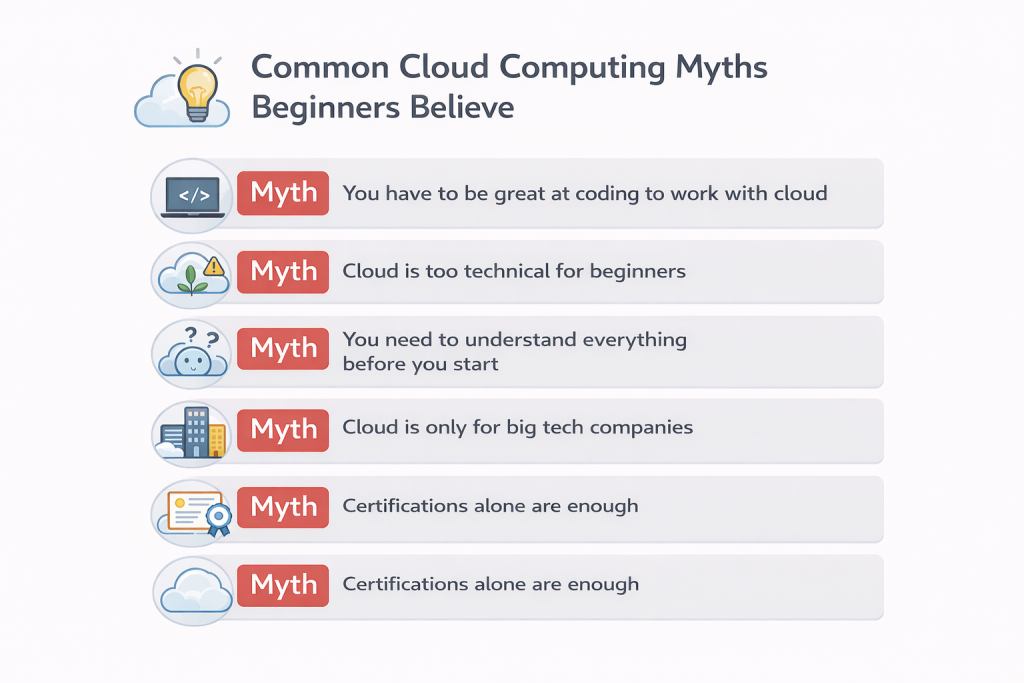
When people first start learning cloud computing basics, they usually don’t struggle with the concepts themselves. They struggle with the stories they’ve already been told about cloud.
Those stories turn into myths, and those myths create fear. Fear is what stops people before they even begin.
Myth 1: You have to be great at coding to work with cloud
This is the biggest misconception by far.
Yes, some cloud roles involve heavy coding. Many do not. Cloud environments need people who understand systems, architecture, security, operations, cost management, and communication. A lot of real-world cloud work revolves around configuration, integration, troubleshooting, and decision-making, not writing code all day.
Here’s a reality check. I don’t code, and I’m a Senior Systems Engineer and IT anchor for third-party applications at a Fortune 25 company. My job is working across networking, firewall, development, security, and architecture teams. The real power in cloud environments is collaboration, not being the person who does everything themselves.
Cloud computing basics are about understanding how services fit together and why certain choices are made. Coding can help, but it is not a prerequisite for learning or providing value.
Myth 2: Cloud is too technical for beginners
Cloud feels intimidating because people are exposed to advanced topics way too early. They hear about Kubernetes, complex networking, and distributed systems before they understand the fundamentals.
That approach is backwards.
You don’t learn a new language by starting with novels. You start with basic vocabulary. Cloud works the same way. If you understand compute as “where things run,” storage as “where data lives,” and networking as “how things talk to each other,” you already understand the core of cloud computing basics.
Cloud is not too technical. It is just poorly introduced most of the time.
Myth 3: You need to understand everything before you start
Many beginners believe they need a complete mental map of cloud before touching anything. That belief leads to endless reading, dozens of open tabs, and zero progress.
Cloud computing basics are learned by doing. Spinning up a simple resource, breaking something safely, and fixing it teaches more than memorizing diagrams ever will. One of my best security lessons came from accidentally updating an SSO configuration and locking an entire product management team out of an app. Oops. But I fixed it, learned from it, and now I know exactly how SSO authentication flows work.
You are allowed to learn one small piece at a time.
Myth 4: Cloud is only for big tech companies
Another common myth is that cloud only matters for massive enterprises or startups with millions of users.
In reality, cloud is often more valuable for small teams. It removes the need for upfront infrastructure costs and dedicated IT staff. Small businesses get access to the same computing power as large ones, just scaled to their needs.
And nearly every company uses cloud in some form. I’ve seen cloud adoption across organizations like McDonald’s, the NBA, Maybelline, Wells Fargo, and Capital One. Different industries, same reality.
Cloud computing basics level the playing field more than most people realize.
Myth 5: Certifications alone are enough
Certifications can be helpful. They provide structure and motivation. But they do not replace hands-on experience.
Hands-on learning is king. Cloud rewards people who can show what they have built, tested, supported, or fixed. Even small personal projects matter because they demonstrate understanding beyond theory.
Certifications support learning. They do not complete it.
The Real Truth Beginners Need to Hear
The biggest thing holding people back from cloud computing basics is not intelligence or background. It is intimidation.
Cloud looks massive from the outside. But when you break it down, it is a set of simple ideas repeated at scale. Renting instead of owning. Scaling instead of guessing. Automating instead of reacting.
Once you let go of the myths, cloud becomes approachable.
You do not need to be an expert. You need to be curious, consistent, and willing to learn by doing. That mindset matters more than any single skill or credential.
What to Learn First After Understanding Cloud Computing Basics
Once cloud computing basics start to make sense, the next challenge is knowing where to focus. This is where a lot of beginners accidentally make things harder than they need to be.
The biggest mistake is trying to learn everything at once.
Cloud platforms are massive by design. They offer hundreds of services because they support many different use cases. That does not mean you need to understand all of them to get started. Trying to do that usually leads to burnout, frustration, and stalled progress.
What not to focus on first
Skip the advanced tooling.
Kubernetes, complex IAM policy design, and advanced networking configurations can wait. Those topics make much more sense once you understand the fundamentals and have context for why they exist. You are not building production infrastructure yet. You are building understanding.
Learning cloud is not about proving how technical you are early on. It is about building a strong mental foundation.
What actually matters early on
Start by picking one cloud platform and committing to it for a while. It does not matter which one you choose. AWS, Google Cloud, and Azure are all fine. What matters is learning how cloud computing basics show up consistently across platforms.
Compute is compute.
Storage is storage.
Networking is networking.
The service names change, but the ideas stay the same.
All three providers offer free tiers and beginner-friendly learning paths. Take advantage of them. Go through the intro courses. Do the labs. Click around in the console. Cloud computing basics do not stick from reading alone. They stick from doing.
Connect cloud to business outcomes early
This is where confidence grows fast, and it is something many tutorials skip.
Understanding how scaling affects cost, how availability impacts users, and how design choices introduce tradeoffs is incredibly valuable. These skills apply whether you plan to be deeply technical or not.
In real-world environments, cloud decisions are rarely just technical. They involve uptime targets, cost constraints, vendor risk, and user impact. Being able to translate business requirements into technical implications is a core cloud skill, even for people who never write code.
This is cloud computing basics applied to real decisions.
Build familiarity before complexity
Another early confidence booster is simply learning how to navigate a cloud environment.
Logging into the console, finding services, understanding basic dashboards, and reading simple metrics all count as progress. You do not need to deploy anything impressive. Familiarity matters more than complexity at this stage.
Comfort comes before confidence.
Now let’s turn all of this into something concrete.
A simple 30-day approach that actually works
Week 1: Explore
Create a free cloud account and click around. Read service descriptions. Complete introductory labs. The goal is exposure, not mastery. Get comfortable with the interface.
AWS: AWS Free Tier + AWS Skill Builder courses
Google Cloud: GCP Free Tier + Google Cloud Skills Boost
Azure: Azure Free Account + Microsoft Learn paths
Weeks 2–3: Build alongside a course
Follow a structured beginner course and build as you go. Pause often. Break things. Fix them. That repetition is how cloud computing basics stick. Watching videos without doing the work does not count.
Week 4: Build something small
Create a personal project. It does not need to be impressive. It just needs to exist.
Examples:
- A simple static website hosted on cloud storage
- A small serverless function that responds to a request
- A hands-on cloud lab or quest that produces a working resource
The value comes from seeing something work end to end.
Soft skills matter more than you think
Cloud environments are collaborative by nature. Being able to explain what you built, why you built it, and what tradeoffs you made is powerful. Clear communication is often more valuable than deep technical detail early on.
Document as you learn. Write down what you tried, what broke, and how you fixed it. This helps you remember and gives you proof of work when someone asks what you have actually built.
The good news is you do not need to rush. Cloud computing basics reward consistency more than speed. Small progress, repeated over time, compounds quickly.
If you can explain what cloud is, why it matters, and how basic services work together, you are already ahead of most people who never get past the buzzwords.
That foundation is enough to move forward with confidence. Everything else builds from there.
Final Thoughts: From Confusion to Confidence
Cloud computing basics are not as complicated as they are often made to sound. What trips people up is not the technology itself. It is the lack of clear, beginner-friendly explanations.
Once you understand that cloud is about renting computing power, scaling based on demand, and paying for what you use, everything starts to feel more manageable. The jargon fades. The fear drops. You stop guessing and start understanding.
You do not need to master every service or memorize endless diagrams. You need a solid mental model, hands-on exposure, and the willingness to learn by doing. That combination is what turns curiosity into confidence.
Cloud shows up everywhere now, whether you notice it or not. It powers the tools you use, the services you rely on, and the systems behind modern businesses. Understanding cloud computing basics gives you context. Context gives you leverage.
If you are early in your journey, the most important step is not picking the perfect platform or chasing the latest trend. It is starting. Create a free account. Touch the tools. Build something small. Document what you learn. Then repeat.
Progress in cloud does not come from waiting until you feel ready. It comes from moving forward before you feel fully prepared.
If you want a structured next step that builds on everything you just learned, start with my core guide here: 👉 Cloud Computing for Beginners
That guide connects the concepts, examples, and next steps into a single learning path so you can keep momentum without getting overwhelmed.
Cloud is already part of your world. Now you understand how it works.
The next move is yours.
🚀 Want a Clear Plan to Start Your Cloud + AI Career?
Download the free Cloud Career Blueprint, a simple, step-by-step guide that shows you what to learn first, what to ignore for now, and how to build real momentum without feeling overwhelmed.
👉 Enter your email below and I’ll send it straight to your inbox.